manage
roles
alfa-bank
product designer
users and roles
manage
roles
alfa-bank
product designer
users and roles
manage
roles
alfa-bank
product designer
users and roles
manage
roles
alfa-bank
product designer
users and roles
about
project
Flexible role model for access control in business banking
The “Users and Roles” product helps businesses create roles, configure permissions, and keep access rules consistent across the team. It makes it easy to review what each role can do and who it affects, so daily operations stay secure and predictable.
Navigation success to reach Roles list
+91%
Reduced time to reach Roles list
x5 faster
Action discovery (find role actions)
+65%
Time to access role actions
−38%
my role
I led the redesign of role management. Based on research findings, I reworked the roles experience to make navigation clearer, role setup faster, and permission review more scannable and consistent.
problems
• Navigation was unclear → people spent time finding where role work starts. • The roles list didn’t scale → large sets were slow and easy to misread. • Key actions were hard to notice → routine tasks took extra steps and got missed. • Permission review was heavy → access checks slowed daily work. • Scanning was inefficient → too much opening and rechecking to feel confident.
business goals
• Improve role management efficiency so teams spend less time on routine access work. • Reduce access risks by making role logic easier to understand and apply correctly. • Make permission review scalable for large roles and teams without extra manual steps. • Improve customer satisfaction (VOC) by making access management predictable and easy to trust.
actions
• Researched how clients set roles and permissions, found key usability gaps. • Redesigned main role flows and navigation to make them simpler and clearer. • Validated the changes in usability tests and aligned analytics to track impact.
results
• +13% VOC score (4.3 → 4.86) • +91% navigation success reaching the Roles list • ×5 faster time to reach the Roles list • +65% action discovery in role actions • −38% time to access role actions
about
project
Flexible role model for access control in business banking
The “Users and Roles” product helps businesses create roles, configure permissions, and keep access rules consistent across the team. It makes it easy to review what each role can do and who it affects, so daily operations stay secure and predictable.
Navigation success to reach Roles list
+91%
Reduced time to reach Roles list
x5 faster
Action discovery (find role actions)
+65%
Time to access role actions
−38%
my role
I led the redesign of role management. Based on research findings, I reworked the roles experience to make navigation clearer, role setup faster, and permission review more scannable and consistent.
problems
• Navigation was unclear → people spent time finding where role work starts. • The roles list didn’t scale → large sets were slow and easy to misread. • Key actions were hard to notice → routine tasks took extra steps and got missed. • Permission review was heavy → access checks slowed daily work. • Scanning was inefficient → too much opening and rechecking to feel confident.
business goals
• Improve role management efficiency so teams spend less time on routine access work. • Reduce access risks by making role logic easier to understand and apply correctly. • Make permission review scalable for large roles and teams without extra manual steps. • Improve customer satisfaction (VOC) by making access management predictable and easy to trust.
actions
• Researched how clients set roles and permissions, found key usability gaps. • Redesigned main role flows and navigation to make them simpler and clearer. • Validated the changes in usability tests and aligned analytics to track impact.
results
• +13% VOC score (4.3 → 4.86) • +91% navigation success reaching the Roles list • ×5 faster time to reach the Roles list • +65% action discovery in role actions • −38% time to access role actions
about
project
Flexible role model for access control in business banking
The “Users and Roles” product helps businesses create roles, configure permissions, and keep access rules consistent across the team. It makes it easy to review what each role can do and who it affects, so daily operations stay secure and predictable.
Navigation success to reach Roles list
+91%
Reduced time to reach Roles list
x5 faster
Action discovery (find role actions)
+65%
Time to access role actions
−38%
my role
I led the redesign of role management. Based on research findings, I reworked the roles experience to make navigation clearer, role setup faster, and permission review more scannable and consistent.
problems
• Navigation was unclear → people spent time finding where role work starts. • The roles list didn’t scale → large sets were slow and easy to misread. • Key actions were hard to notice → routine tasks took extra steps and got missed. • Permission review was heavy → access checks slowed daily work. • Scanning was inefficient → too much opening and rechecking to feel confident.
business goals
• Improve role management efficiency so teams spend less time on routine access work. • Reduce access risks by making role logic easier to understand and apply correctly. • Make permission review scalable for large roles and teams without extra manual steps. • Improve customer satisfaction (VOC) by making access management predictable and easy to trust.
actions
• Researched how clients set roles and permissions, found key usability gaps. • Redesigned main role flows and navigation to make them simpler and clearer. • Validated the changes in usability tests and aligned analytics to track impact.
results
• +13% VOC score (4.3 → 4.86) • +91% navigation success reaching the Roles list • ×5 faster time to reach the Roles list • +65% action discovery in role actions • −38% time to access role actions
about
project
Flexible role model for access control in business banking
The “Users and Roles” product helps businesses create roles, configure permissions, and keep access rules consistent across the team. It makes it easy to review what each role can do and who it affects, so daily operations stay secure and predictable.
Navigation success to reach Roles list
+91%
Reduced time to reach Roles list
x5 faster
Action discovery (find role actions)
+65%
Time to access role actions
−38%
my role
I led the redesign of role management. Based on research findings, I reworked the roles experience to make navigation clearer, role setup faster, and permission review more scannable and consistent.
problems
• Navigation was unclear → people spent time finding where role work starts. • The roles list didn’t scale → large sets were slow and easy to misread. • Key actions were hard to notice → routine tasks took extra steps and got missed. • Permission review was heavy → access checks slowed daily work. • Scanning was inefficient → too much opening and rechecking to feel confident.
business goals
• Improve role management efficiency so teams spend less time on routine access work. • Reduce access risks by making role logic easier to understand and apply correctly. • Make permission review scalable for large roles and teams without extra manual steps. • Improve customer satisfaction (VOC) by making access management predictable and easy to trust.
actions
• Researched how clients set roles and permissions, found key usability gaps. • Redesigned main role flows and navigation to make them simpler and clearer. • Validated the changes in usability tests and aligned analytics to track impact.
results
• +13% VOC score (4.3 → 4.86) • +91% navigation success reaching the Roles list • ×5 faster time to reach the Roles list • +65% action discovery in role actions • −38% time to access role actions
terminology
Product context
In corporate online banking, many people use one company account, but they need different access to actions and data. We built Users & Roles to define what each user can do and see, including roles and restrictions, so the interface always shows the right functionality safely.
terminology
Product context
In corporate online banking, many people use one company account, but they need different access to actions and data. We built Users & Roles to define what each user can do and see, including roles and restrictions, so the interface always shows the right functionality safely.
terminology
Product context
In corporate online banking, many people use one company account, but they need different access to actions and data. We built Users & Roles to define what each user can do and see, including roles and restrictions, so the interface always shows the right functionality safely.
terminology
Product context
In corporate online banking, many people use one company account, but they need different access to actions and data. We built Users & Roles to define what each user can do and see, including roles and restrictions, so the interface always shows the right functionality safely.
what is a role?
A role is a set of permissions that defines which actions a user can perform and which data they can access in the system. A role is not a job title or a person. It is only a configuration of access rules inside the product.
who is a user?
A user is a person who has access to a company account in the internet bank and works with banking services on behalf of the company. What the user can see and do is strictly defined by their role.
what are permissions?
Permissions are specific rights inside a role that allow a user to perform certain actions or view certain data. Roles are built from multiple permissions.
discovery
Understanding how users set up roles and permissions
Together with a UX researcher, I conducted this study to learn how business owners, CFOs, and accountants set up roles and permissions in online banking and what challenges they face. We analyzed real workflows, uncovered usability issues, and applied the insights to guide the redesign.
discovery
Understanding how users set up roles and permissions
Together with a UX researcher, I conducted this study to learn how business owners, CFOs, and accountants set up roles and permissions in online banking and what challenges they face. We analyzed real workflows, uncovered usability issues, and applied the insights to guide the redesign.
discovery
Understanding how users set up roles and permissions
Together with a UX researcher, I conducted this study to learn how business owners, CFOs, and accountants set up roles and permissions in online banking and what challenges they face. We analyzed real workflows, uncovered usability issues, and applied the insights to guide the redesign.
discovery
Understanding how users set up roles and permissions
Together with a UX researcher, I conducted this study to learn how business owners, CFOs, and accountants set up roles and permissions in online banking and what challenges they face. We analyzed real workflows, uncovered usability issues, and applied the insights to guide the redesign.
methodology:
• 8 participants from small businesses (owners, CFOs, accountants) • In-depth interviews + usability testing (50–60 min each) • Mix of Alfa-Bank and other banks’ clients (mass-segment)
research goals:
• Understand how users find role management and navigate to the roles list • Identify issues with discovering role actions and understanding role details • Find the main pain points in permission review at scale
key tasks:
• Observe how users reach the roles list and manage roles in real scenarios • Detect recurring mistakes and moments of uncertainty when reviewing access • Summarize insights and propose UX improvements • Study how users scan permissions and role assignments without extra navigation
methodology:
• 8 participants from small businesses (owners, CFOs, accountants) • In-depth interviews + usability testing (50–60 min each) • Mix of Alfa-Bank and other banks’ clients (mass-segment)
research goals:
• Understand how users find role management and navigate to the roles list • Identify issues with discovering role actions and understanding role details • Find the main pain points in permission review at scale
key tasks:
• Observe how users reach the roles list and manage roles in real scenarios • Detect recurring mistakes and moments of uncertainty when reviewing access • Summarize insights and propose UX improvements • Study how users scan permissions and role assignments without extra navigation
methodology:
• 8 participants from small businesses (owners, CFOs, accountants) • In-depth interviews + usability testing (50–60 min each) • Mix of Alfa-Bank and other banks’ clients (mass-segment)
research goals:
• Understand how users find role management and navigate to the roles list • Identify issues with discovering role actions and understanding role details • Find the main pain points in permission review at scale
key tasks:
• Observe how users reach the roles list and manage roles in real scenarios • Detect recurring mistakes and moments of uncertainty when reviewing access • Summarize insights and propose UX improvements • Study how users scan permissions and role assignments without extra navigation
methodology:
• 8 participants from small businesses (owners, CFOs, accountants) • In-depth interviews + usability testing (50–60 min each) • Mix of Alfa-Bank and other banks’ clients (mass-segment)
research goals:
• Understand how users find role management and navigate to the roles list • Identify issues with discovering role actions and understanding role details • Find the main pain points in permission review at scale
key tasks:
• Observe how users reach the roles list and manage roles in real scenarios • Detect recurring mistakes and moments of uncertainty when reviewing access • Summarize insights and propose UX improvements • Study how users scan permissions and role assignments without extra navigation
Research insights
Usability interviews and tests showed a consistent pattern: people struggled to find where role management starts, felt overwhelmed by long permission lists, and did not understand role types. As a result, they moved slower, doubted their choices, and needed extra checks before trusting access settings.
Research insights
Usability interviews and tests showed a consistent pattern: people struggled to find where role management starts, felt overwhelmed by long permission lists, and did not understand role types. As a result, they moved slower, doubted their choices, and needed extra checks before trusting access settings.
Research insights
Usability interviews and tests showed a consistent pattern: people struggled to find where role management starts, felt overwhelmed by long permission lists, and did not understand role types. As a result, they moved slower, doubted their choices, and needed extra checks before trusting access settings.
Research insights
Usability interviews and tests showed a consistent pattern: people struggled to find where role management starts, felt overwhelmed by long permission lists, and did not understand role types. As a result, they moved slower, doubted their choices, and needed extra checks before trusting access settings.
“I come here to work with roles, but I still spend time just figuring out where to start. I expected the entry point to be obvious.”
“I come here to work with roles, but I still spend time just figuring out where to start. I expected the entry point to be obvious.”
“I come here to work with roles, but I still spend time just figuring out where to start. I expected the entry point to be obvious.”
“I come here to work with roles, but I still spend time just figuring out where to start. I expected the entry point to be obvious.”
“The list feels too long and looks the same everywhere. I cannot quickly compare roles and understand what is different.”
“The list feels too long and looks the same everywhere. I cannot quickly compare roles and understand what is different.”
“The list feels too long and looks the same everywhere. I cannot quickly compare roles and understand what is different.”
“The list feels too long and looks the same everywhere. I cannot quickly compare roles and understand what is different.”
“I keep missing actions, so I click around and recheck everything. For access settings, that feels risky.”
“I keep missing actions, so I click around and recheck everything. For access settings, that feels risky.”
“I keep missing actions, so I click around and recheck everything. For access settings, that feels risky.”
“I keep missing actions, so I click around and recheck everything. For access settings, that feels risky.”
“When I open a few permission sections, the block gets messy. I lose context and it becomes hard to understand what I already checked.”
“When I open a few permission sections, the block gets messy. I lose context and it becomes hard to understand what I already checked.”
“When I open a few permission sections, the block gets messy. I lose context and it becomes hard to understand what I already checked.”
“When I open a few permission sections, the block gets messy. I lose context and it becomes hard to understand what I already checked.”


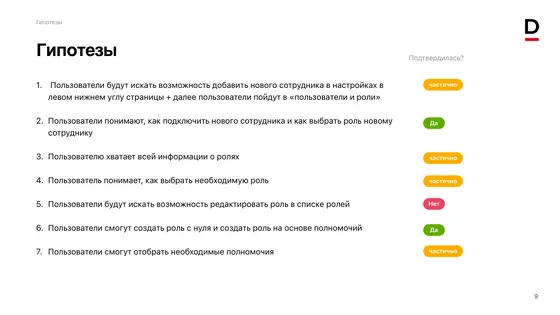
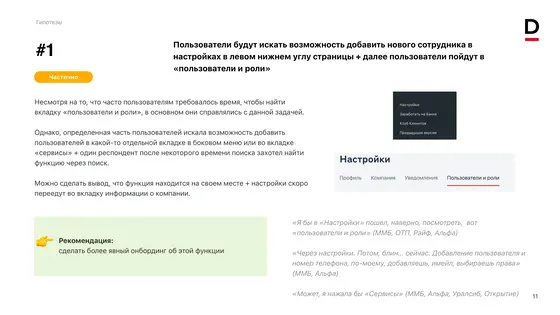
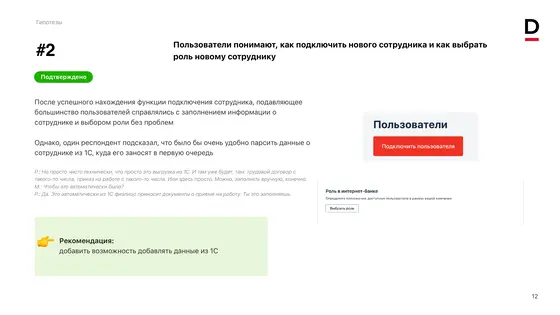
main page
Role page overview
The role page is a core part of access management, so it must be clear and easy to use. Since one role can be assigned to many users, the page should show key details, permissions, and assigned users at a glance, without extra steps
main page
Role page overview
The role page is a core part of access management, so it must be clear and easy to use. Since one role can be assigned to many users, the page should show key details, permissions, and assigned users at a glance, without extra steps
main page
Role page overview
The role page is a core part of access management, so it must be clear and easy to use. Since one role can be assigned to many users, the page should show key details, permissions, and assigned users at a glance, without extra steps
main page
Role page overview
The role page is a core part of access management, so it must be clear and easy to use. Since one role can be assigned to many users, the page should show key details, permissions, and assigned users at a glance, without extra steps
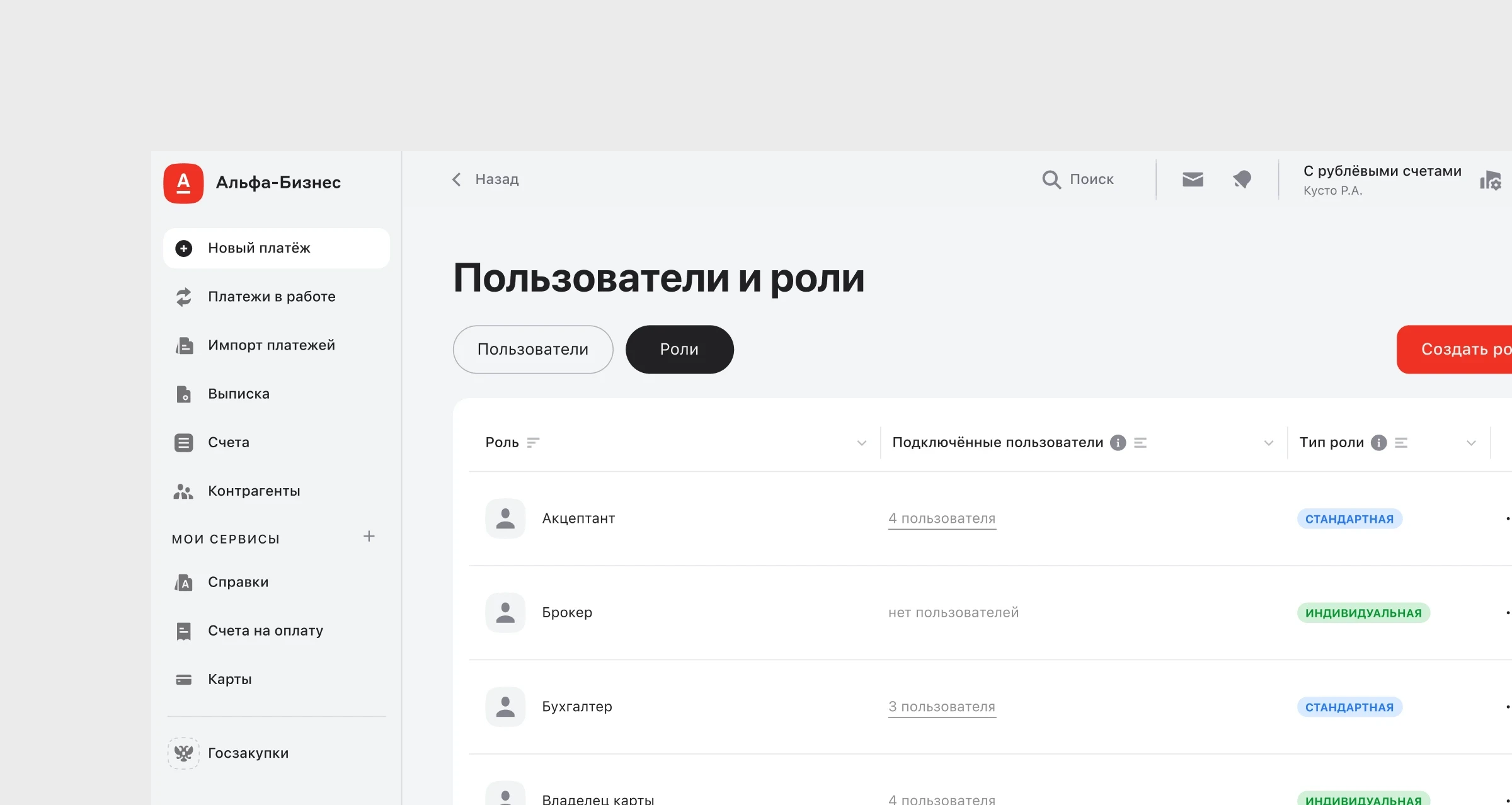
Before redesign
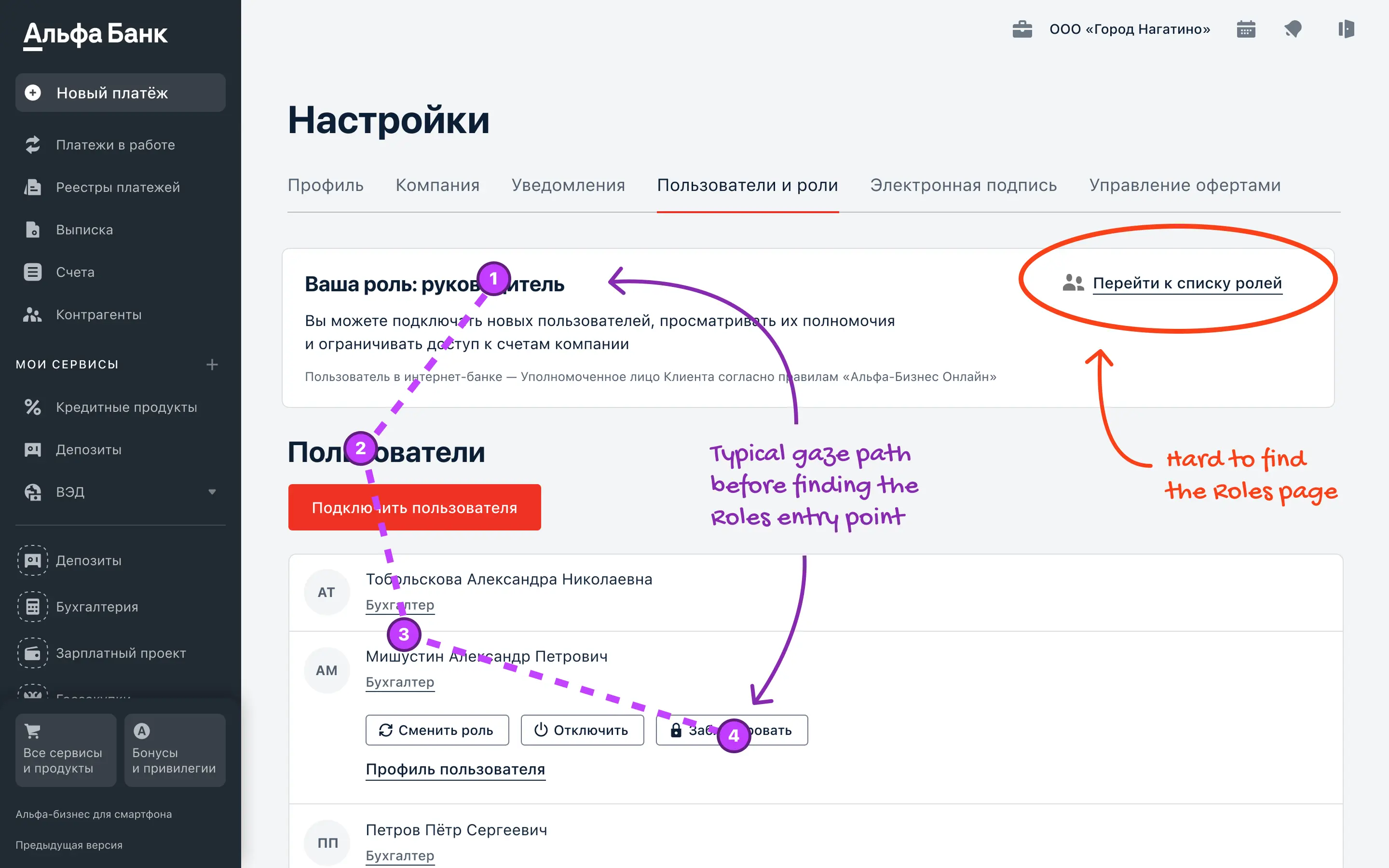
Before the redesign, the main page did not give a clear starting point for role management. During testing, users often could not find the link to the roles list and had to spend extra time navigating.
Before redesign
Before the redesign, the main page did not give a clear starting point for role management. During testing, users often could not find the link to the roles list and had to spend extra time navigating.
Before redesign
Before the redesign, the main page did not give a clear starting point for role management. During testing, users often could not find the link to the roles list and had to spend extra time navigating.
Before redesign
Before the redesign, the main page did not give a clear starting point for role management. During testing, users often could not find the link to the roles list and had to spend extra time navigating.
Problems
Users did not notice where to open the roles list and struggled to navigate.
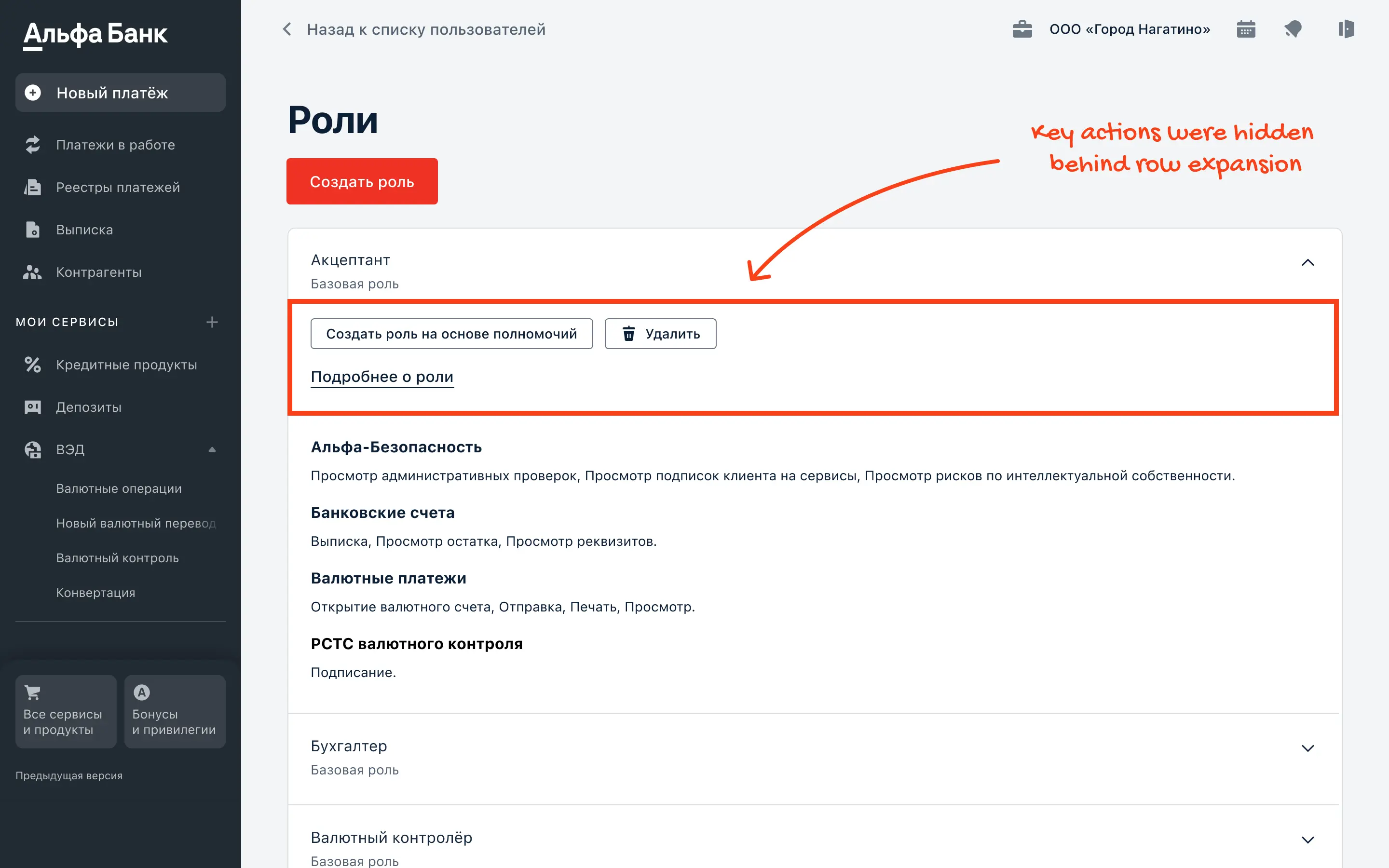
Key actions were hidden behind row expansion, so they were often missed.
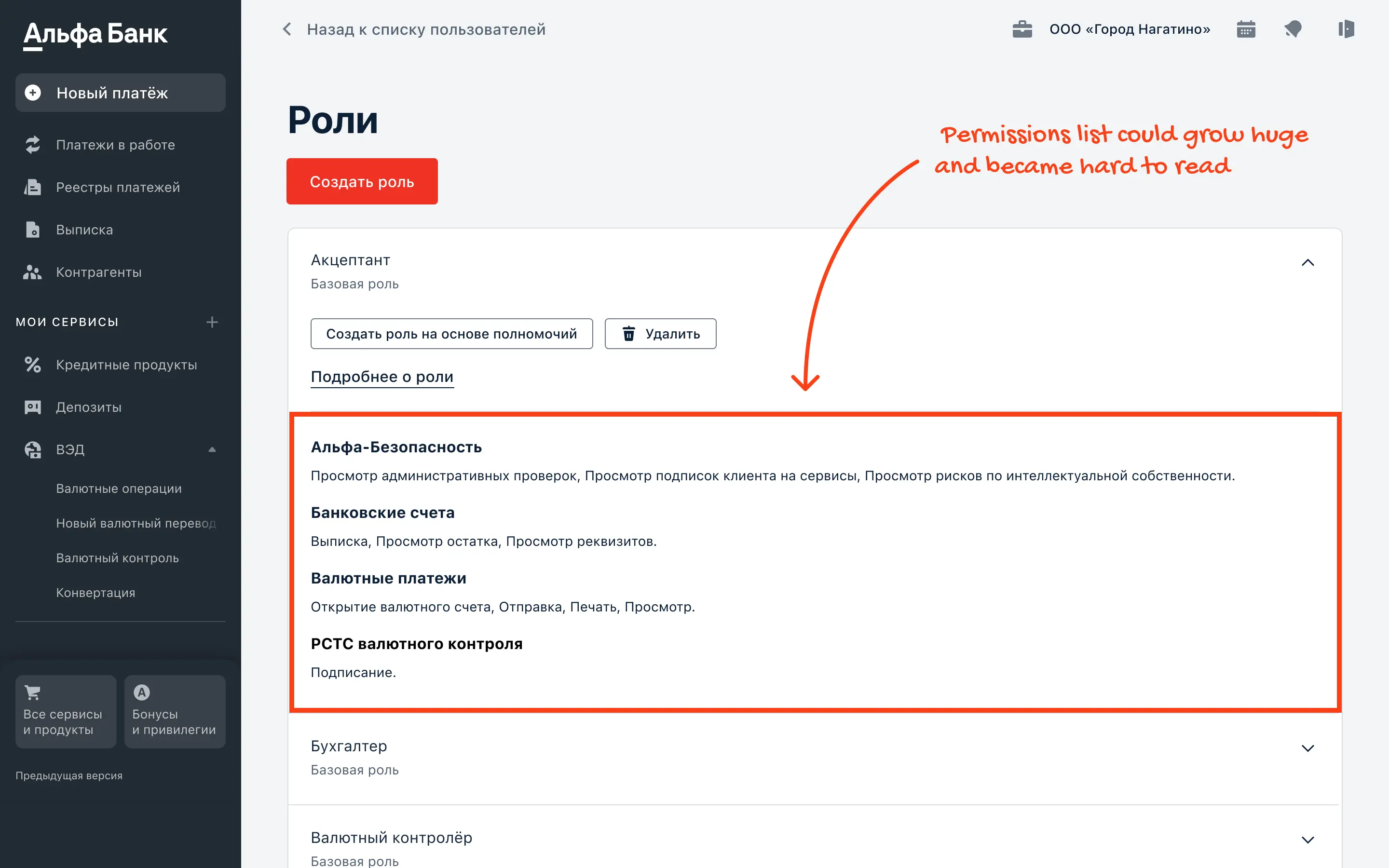
Permissions were hard to scan at scale. With dozens of sections, users had to expand each one to review access.
Eye-tracking testing showed that users needed several visual fixations to notice the link to the roles list.
Problems
Users did not notice where to open the roles list and struggled to navigate.
Key actions were hidden behind row expansion, so they were often missed.
Permissions were hard to scan at scale. With dozens of sections, users had to expand each one to review access.
Eye-tracking testing showed that users needed several visual fixations to notice the link to the roles list.
Problems
Users did not notice where to open the roles list and struggled to navigate.
Key actions were hidden behind row expansion, so they were often missed.
Permissions were hard to scan at scale. With dozens of sections, users had to expand each one to review access.
Eye-tracking testing showed that users needed several visual fixations to notice the link to the roles list.
Problems
Users did not notice where to open the roles list and struggled to navigate.
Key actions were hidden behind row expansion, so they were often missed.
Permissions were hard to scan at scale. With dozens of sections, users had to expand each one to review access.
Eye-tracking testing showed that users needed several visual fixations to notice the link to the roles list.
After redesign
Based on research, I redesigned the core role flows and simplified the structure. This made the Roles entry point clearer, actions easier to find, and permission review more confident at scale.
After redesign
Based on research, I redesigned the core role flows and simplified the structure. This made the Roles entry point clearer, actions easier to find, and permission review more confident at scale.
After redesign
Based on research, I redesigned the core role flows and simplified the structure. This made the Roles entry point clearer, actions easier to find, and permission review more confident at scale.
After redesign
Based on research, I redesigned the core role flows and simplified the structure. This made the Roles entry point clearer, actions easier to find, and permission review more confident at scale.
Problem and solution
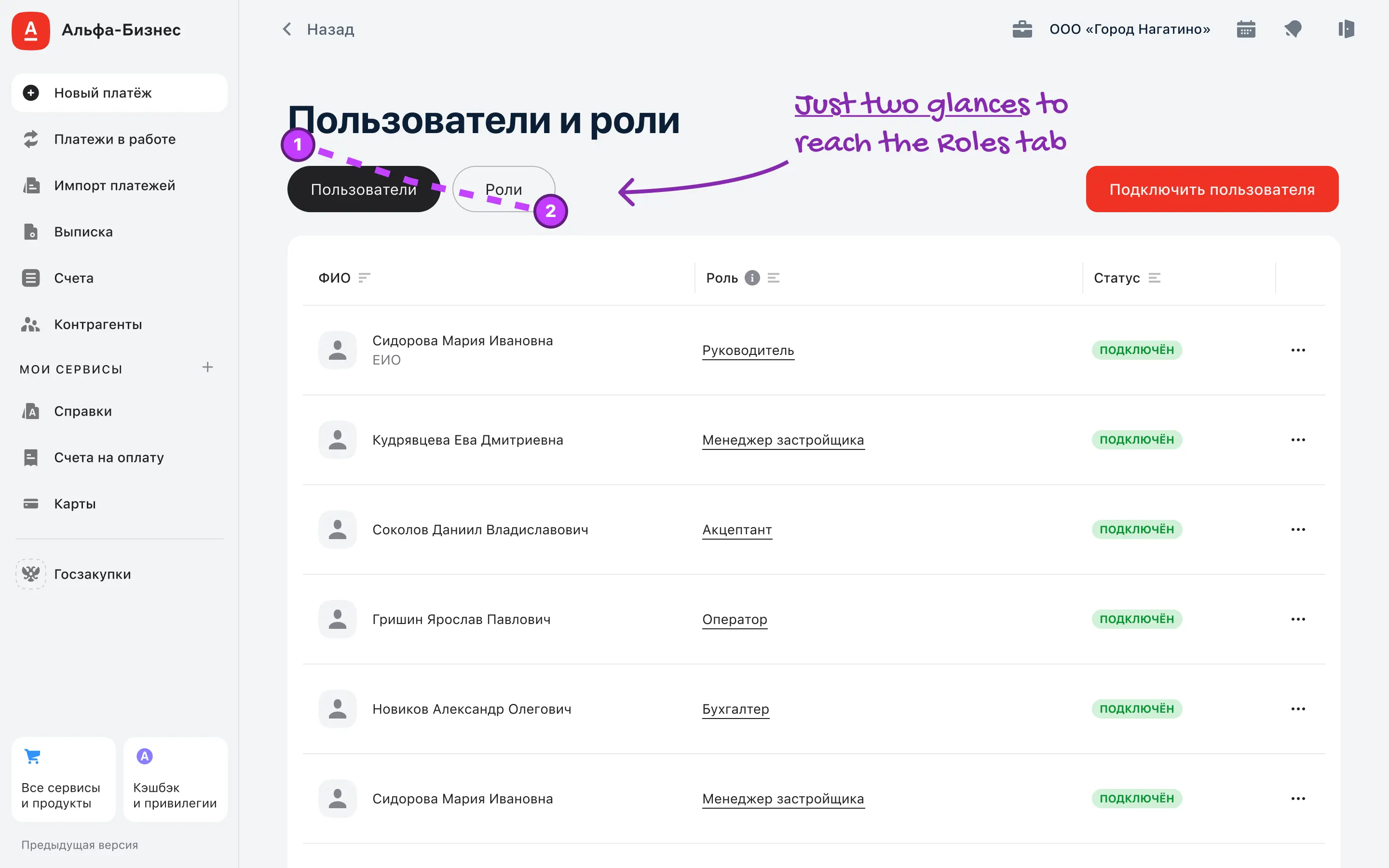
Problem: users did not notice where to open the roles list and got confused.
Solution: I moved the Users/Roles switcher to a prominent, always visible spot and redesigned the page to make Roles an explicit entry point. First-click and eye-tracking results show that users reach the Roles entry point in 3 visual fixations, resolving the confusion around where to manage roles.
Problem and solution
Problem: users did not notice where to open the roles list and got confused.
Solution: I moved the Users/Roles switcher to a prominent, always visible spot and redesigned the page to make Roles an explicit entry point. First-click and eye-tracking results show that users reach the Roles entry point in 3 visual fixations, resolving the confusion around where to manage roles.
Problem and solution
Problem: users did not notice where to open the roles list and got confused.
Solution: I moved the Users/Roles switcher to a prominent, always visible spot and redesigned the page to make Roles an explicit entry point. First-click and eye-tracking results show that users reach the Roles entry point in 3 visual fixations, resolving the confusion around where to manage roles.
Problem and solution
Problem: users did not notice where to open the roles list and got confused.
Solution: I moved the Users/Roles switcher to a prominent, always visible spot and redesigned the page to make Roles an explicit entry point. First-click and eye-tracking results show that users reach the Roles entry point in 3 visual fixations, resolving the confusion around where to manage roles.
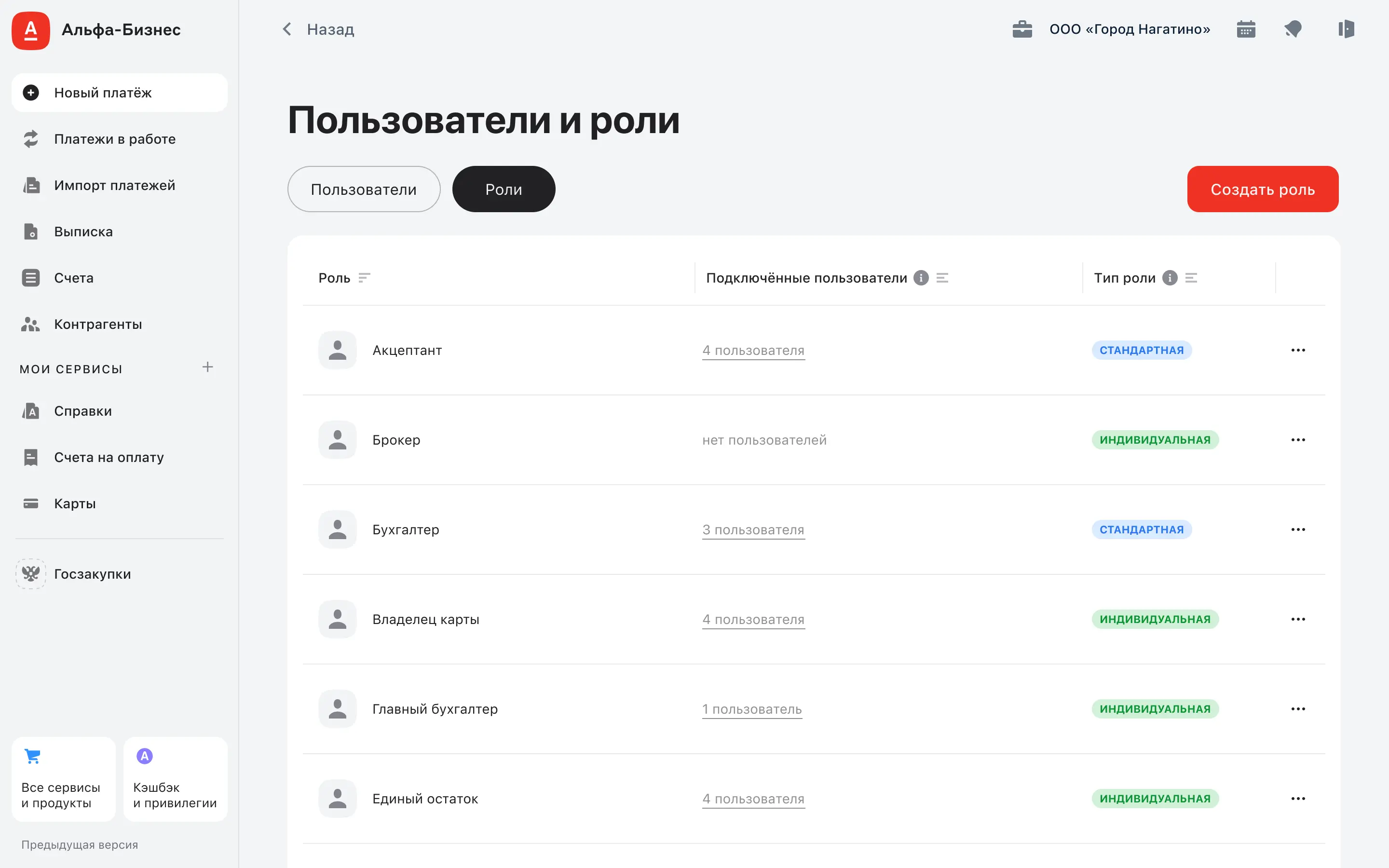
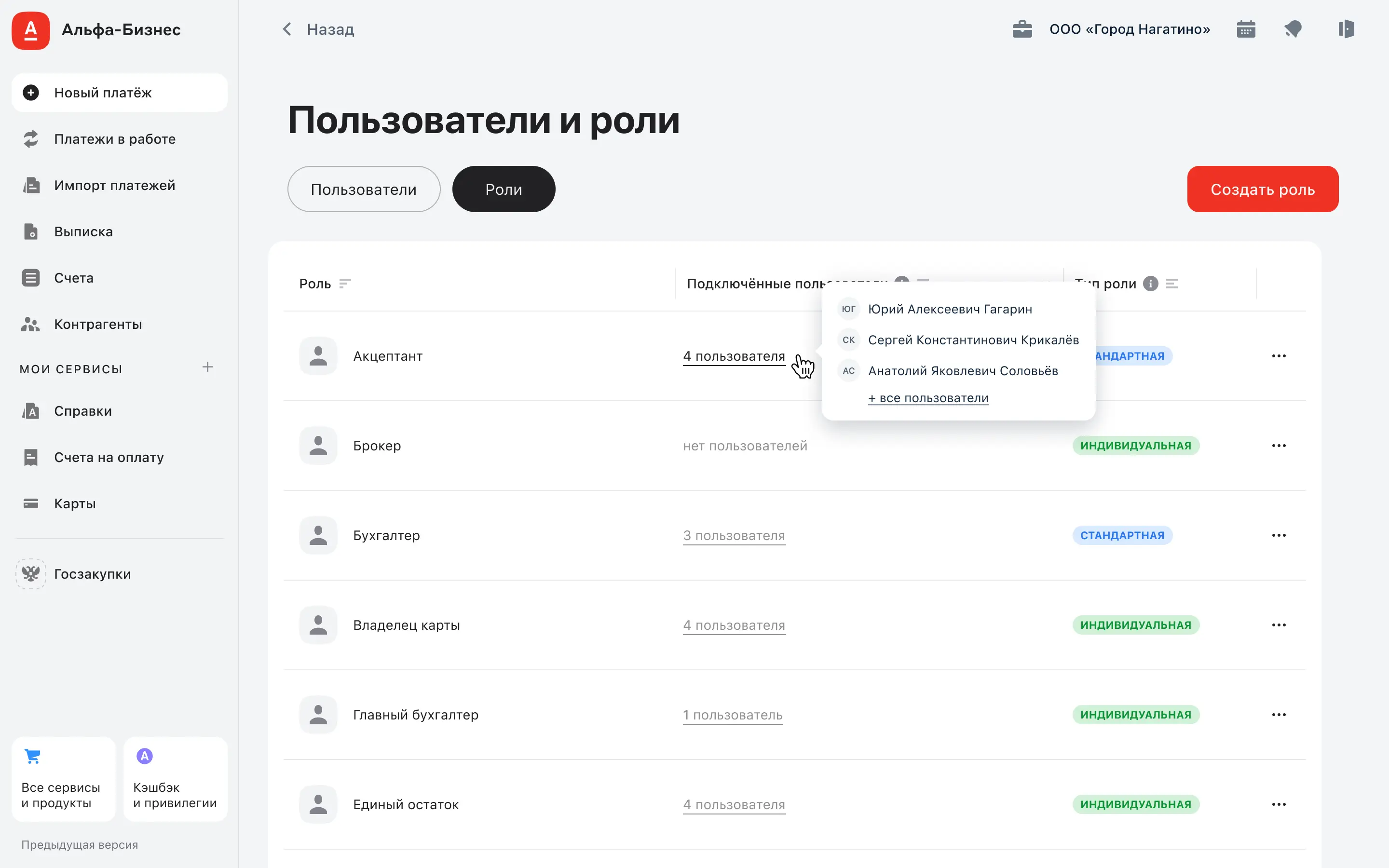
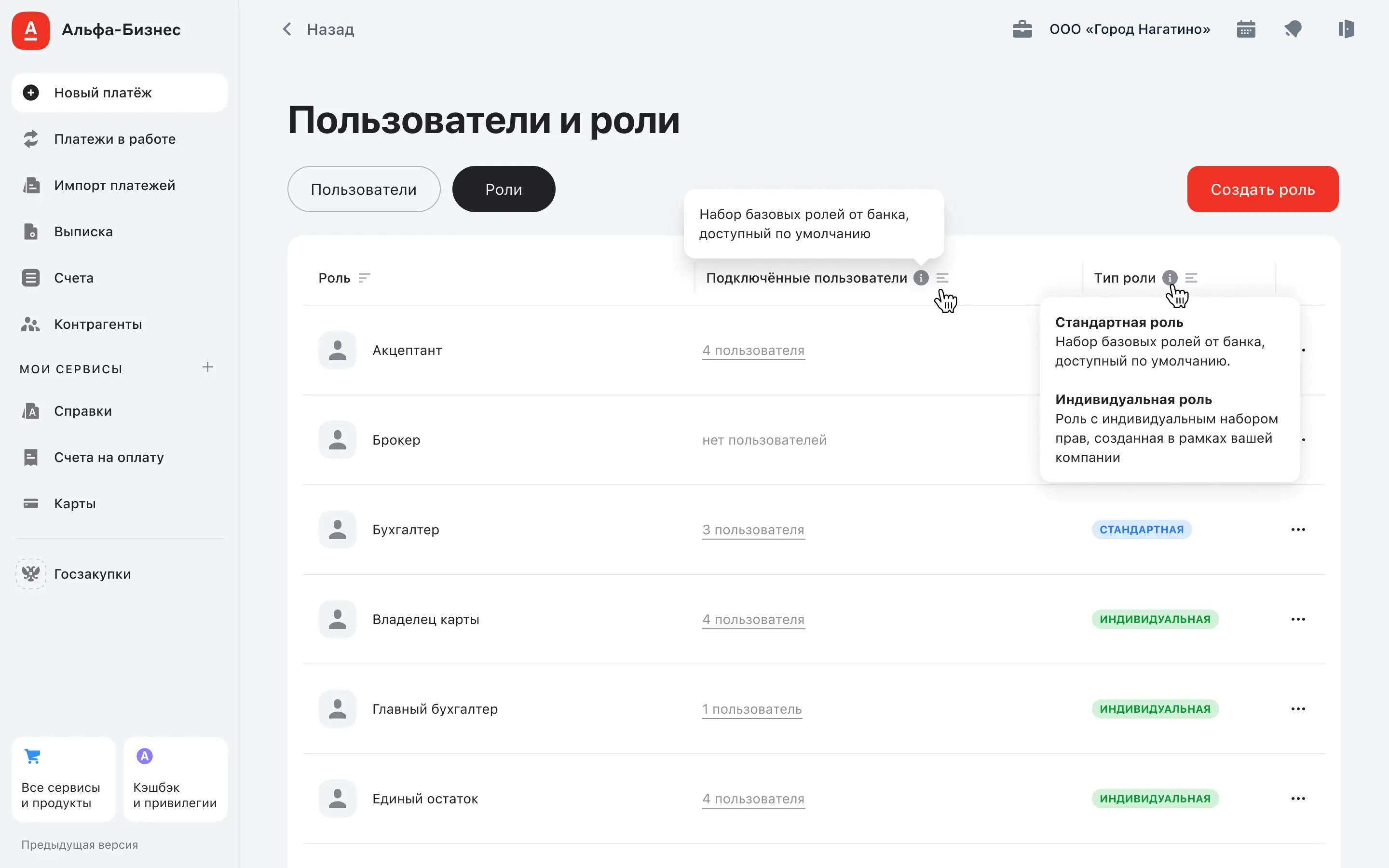
Problem and solution
Problem: Users could not quickly see how many people were assigned to each role, which made role management harder in large teams.
Problem: Users did not understand the difference between standard and individual roles and asked for a clear explanation.
Solution: The role list now shows assignment coverage at a glance: the user count is visible immediately, and a hover preview shows the first three assigned users with a link to view all. This reduces the need to open roles just to check who is assigned.
Solution: A dedicated “Role type” column with tooltips explains what standard and individual roles mean. This helps users understand the difference and choose the right role faster.
Problem and solution
Problem: Users could not quickly see how many people were assigned to each role, which made role management harder in large teams.
Problem: Users did not understand the difference between standard and individual roles and asked for a clear explanation.
Solution: The role list now shows assignment coverage at a glance: the user count is visible immediately, and a hover preview shows the first three assigned users with a link to view all. This reduces the need to open roles just to check who is assigned.
Solution: A dedicated “Role type” column with tooltips explains what standard and individual roles mean. This helps users understand the difference and choose the right role faster.
Problem and solution
Problem: Users could not quickly see how many people were assigned to each role, which made role management harder in large teams.
Problem: Users did not understand the difference between standard and individual roles and asked for a clear explanation.
Solution: The role list now shows assignment coverage at a glance: the user count is visible immediately, and a hover preview shows the first three assigned users with a link to view all. This reduces the need to open roles just to check who is assigned.
Solution: A dedicated “Role type” column with tooltips explains what standard and individual roles mean. This helps users understand the difference and choose the right role faster.
Problem and solution
Problem: Users could not quickly see how many people were assigned to each role, which made role management harder in large teams.
Problem: Users did not understand the difference between standard and individual roles and asked for a clear explanation.
Solution: The role list now shows assignment coverage at a glance: the user count is visible immediately, and a hover preview shows the first three assigned users with a link to view all. This reduces the need to open roles just to check who is assigned.
Solution: A dedicated “Role type” column with tooltips explains what standard and individual roles mean. This helps users understand the difference and choose the right role faster.
role page
Role details and assigned users
The role page is where companies review what a role can do and who has it. In large teams, one role can be assigned to dozens of people, so the page must make permissions and assigned users easy to scan and update without extra navigation.
role page
Role details and assigned users
The role page is where companies review what a role can do and who has it. In large teams, one role can be assigned to dozens of people, so the page must make permissions and assigned users easy to scan and update without extra navigation.
role page
Role details and assigned users
The role page is where companies review what a role can do and who has it. In large teams, one role can be assigned to dozens of people, so the page must make permissions and assigned users easy to scan and update without extra navigation.
role page
Role details and assigned users
The role page is where companies review what a role can do and who has it. In large teams, one role can be assigned to dozens of people, so the page must make permissions and assigned users easy to scan and update without extra navigation.
Before redesign
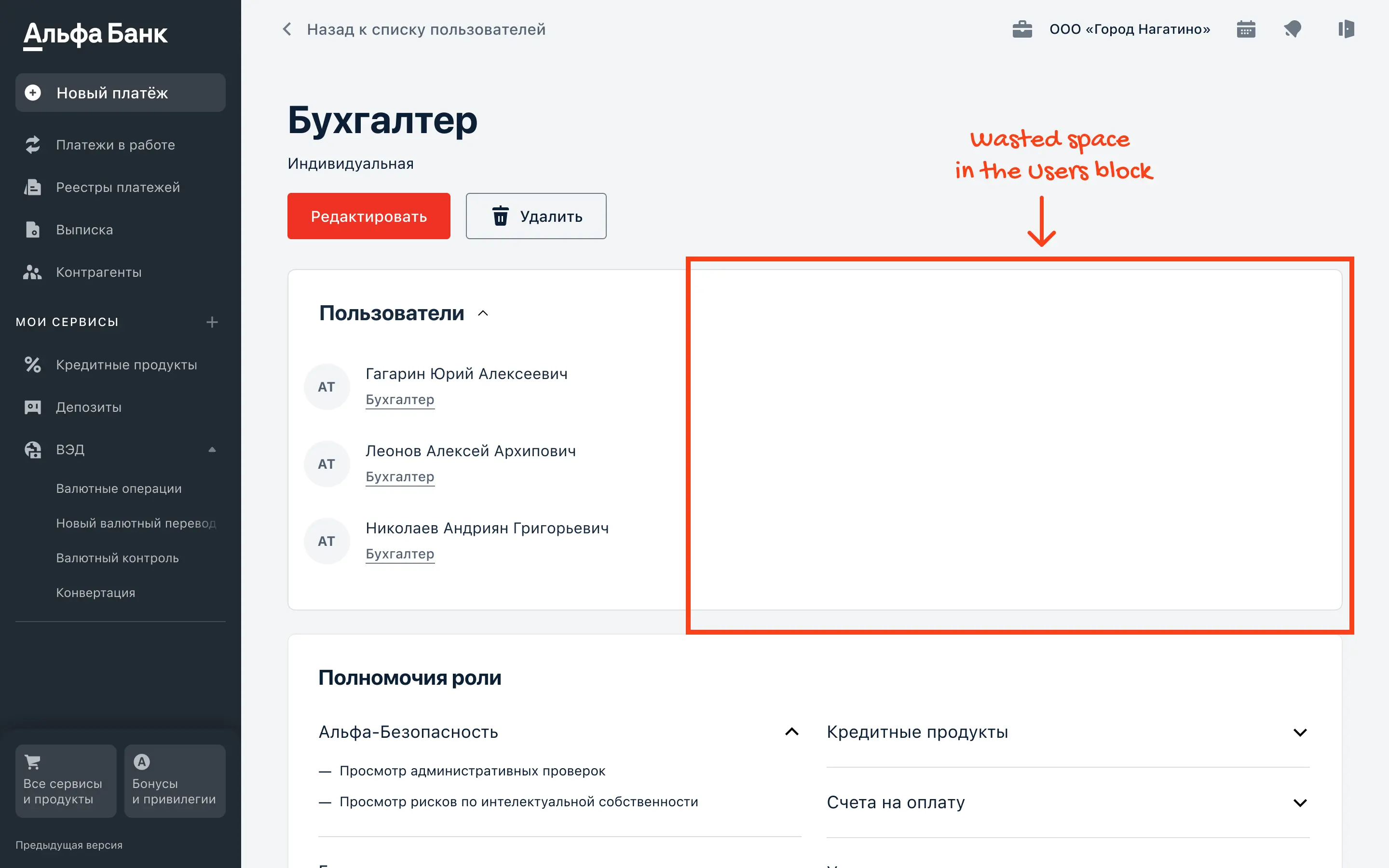
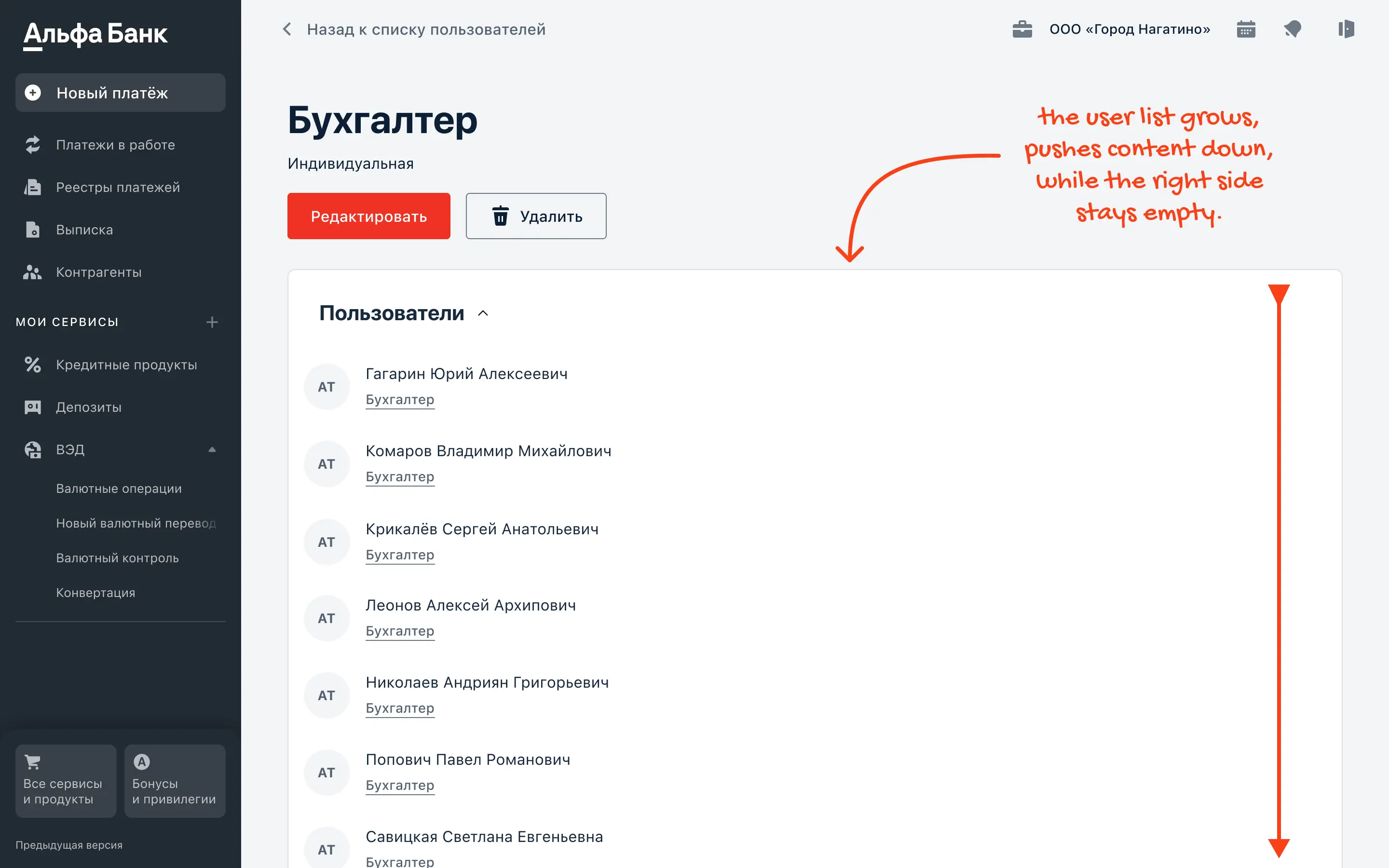
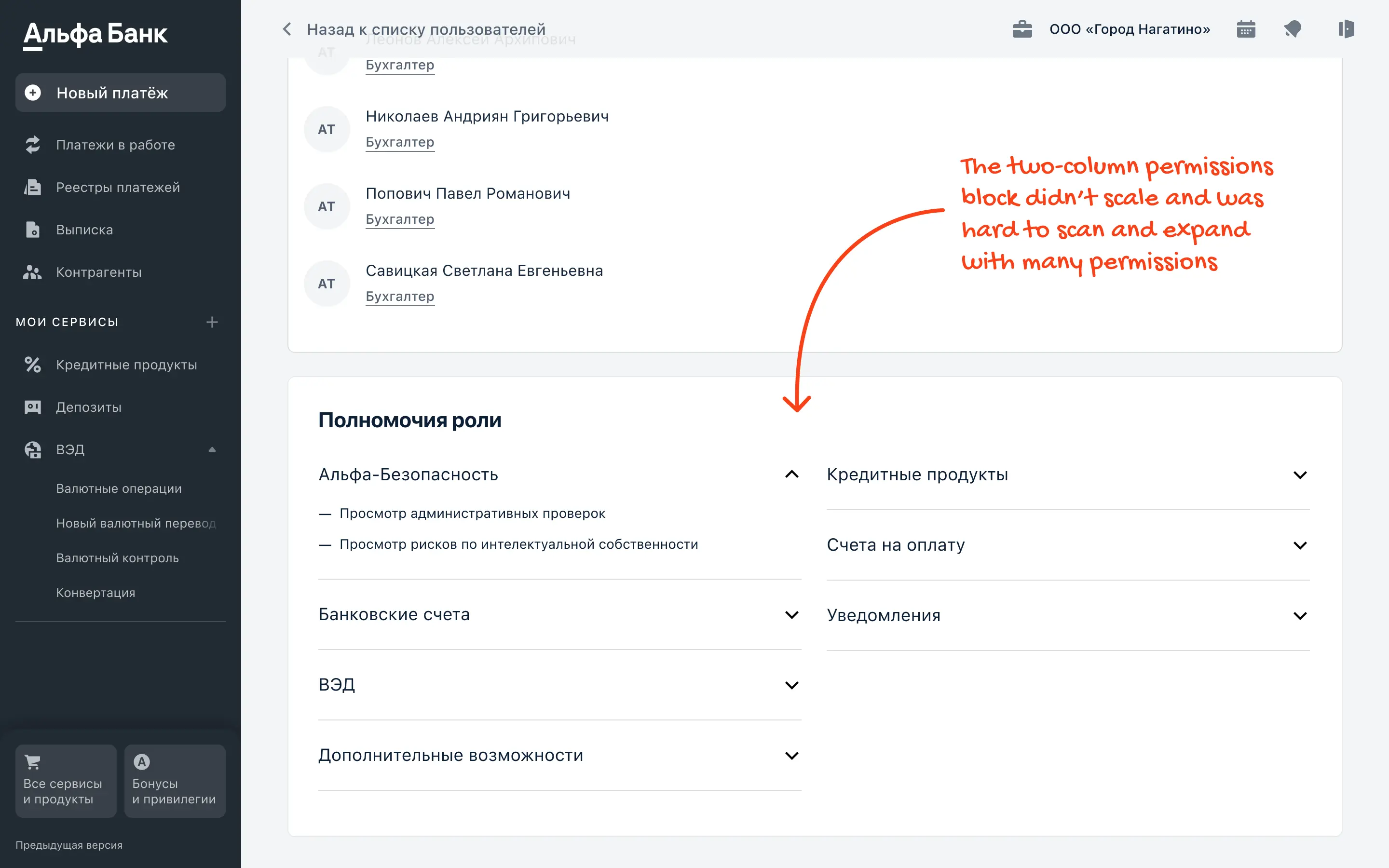
The role page did not scale well for large teams. Assigned users took too much space and pushed key content below the fold, while permission review required lots of scrolling and repetitive expanding. Even basic interactions felt unclear, because expand controls were small and easy to miss.
Before redesign
The role page did not scale well for large teams. Assigned users took too much space and pushed key content below the fold, while permission review required lots of scrolling and repetitive expanding. Even basic interactions felt unclear, because expand controls were small and easy to miss.
Before redesign
The role page did not scale well for large teams. Assigned users took too much space and pushed key content below the fold, while permission review required lots of scrolling and repetitive expanding. Even basic interactions felt unclear, because expand controls were small and easy to miss.
Before redesign
The role page did not scale well for large teams. Assigned users took too much space and pushed key content below the fold, while permission review required lots of scrolling and repetitive expanding. Even basic interactions felt unclear, because expand controls were small and easy to miss.
Problems
The Users block wastes space with a large empty area on the right, so the page does not use the layout efficiently.
The Users list does not scale for large companies. With dozens of employees, the block grows too tall and pushes key content below the fold, making role review slower and more scroll heavy.
The Role permissions block does not scale. When there are many sections and permissions, users must expand each one manually, which slows down review.
Expanding sections in the Role permissions block relies on small chevrons placed away from section titles, breaking proximity and making it unclear where to click.
Problems
The Users block wastes space with a large empty area on the right, so the page does not use the layout efficiently.
The Users list does not scale for large companies. With dozens of employees, the block grows too tall and pushes key content below the fold, making role review slower and more scroll heavy.
The Role permissions block does not scale. When there are many sections and permissions, users must expand each one manually, which slows down review.
Expanding sections in the Role permissions block relies on small chevrons placed away from section titles, breaking proximity and making it unclear where to click.
Problems
The Users block wastes space with a large empty area on the right, so the page does not use the layout efficiently.
The Users list does not scale for large companies. With dozens of employees, the block grows too tall and pushes key content below the fold, making role review slower and more scroll heavy.
The Role permissions block does not scale. When there are many sections and permissions, users must expand each one manually, which slows down review.
Expanding sections in the Role permissions block relies on small chevrons placed away from section titles, breaking proximity and making it unclear where to click.
Problems
The Users block wastes space with a large empty area on the right, so the page does not use the layout efficiently.
The Users list does not scale for large companies. With dozens of employees, the block grows too tall and pushes key content below the fold, making role review slower and more scroll heavy.
The Role permissions block does not scale. When there are many sections and permissions, users must expand each one manually, which slows down review.
Expanding sections in the Role permissions block relies on small chevrons placed away from section titles, breaking proximity and making it unclear where to click.
After redesign
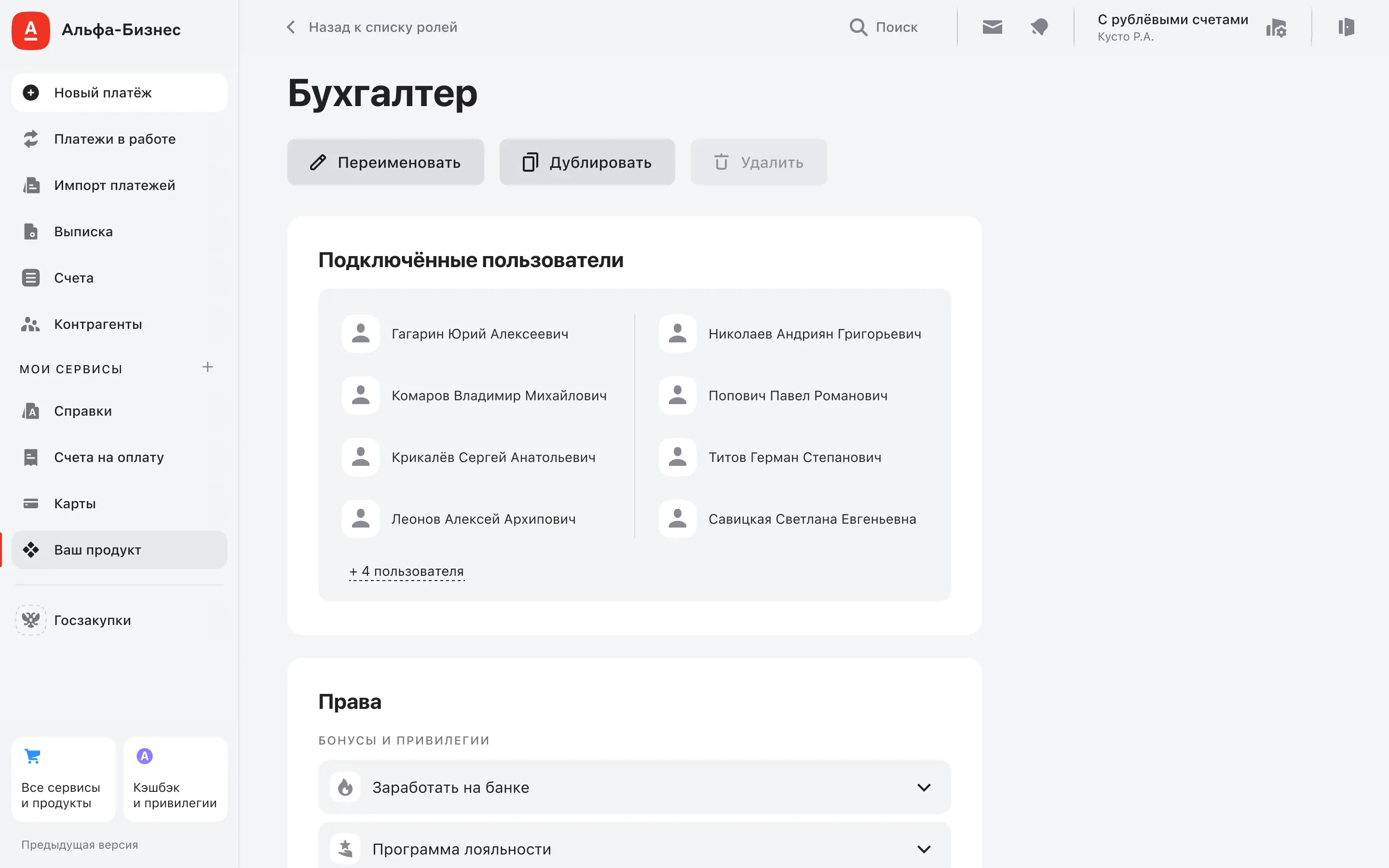
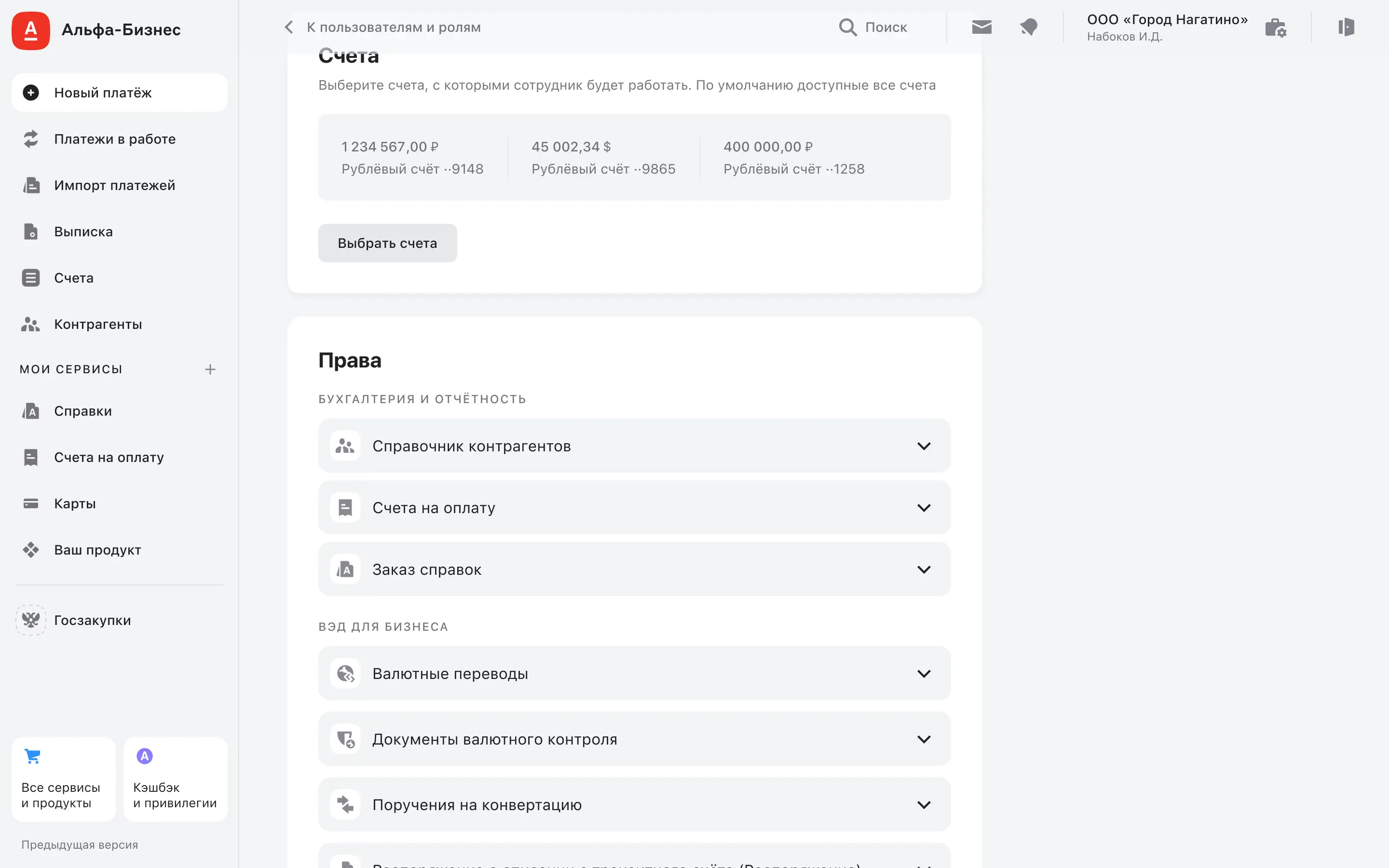
I redesigned the layout to keep the most important information visible and scannable. Assigned users became compact and predictable, with the full list available without overloading the page. Permissions review was reworked into a clearer structure, with more obvious expansion behavior to reduce misclicks and keep context.
After redesign
I redesigned the layout to keep the most important information visible and scannable. Assigned users became compact and predictable, with the full list available without overloading the page. Permissions review was reworked into a clearer structure, with more obvious expansion behavior to reduce misclicks and keep context.
After redesign
I redesigned the layout to keep the most important information visible and scannable. Assigned users became compact and predictable, with the full list available without overloading the page. Permissions review was reworked into a clearer structure, with more obvious expansion behavior to reduce misclicks and keep context.
After redesign
I redesigned the layout to keep the most important information visible and scannable. Assigned users became compact and predictable, with the full list available without overloading the page. Permissions review was reworked into a clearer structure, with more obvious expansion behavior to reduce misclicks and keep context.
Problem and solution
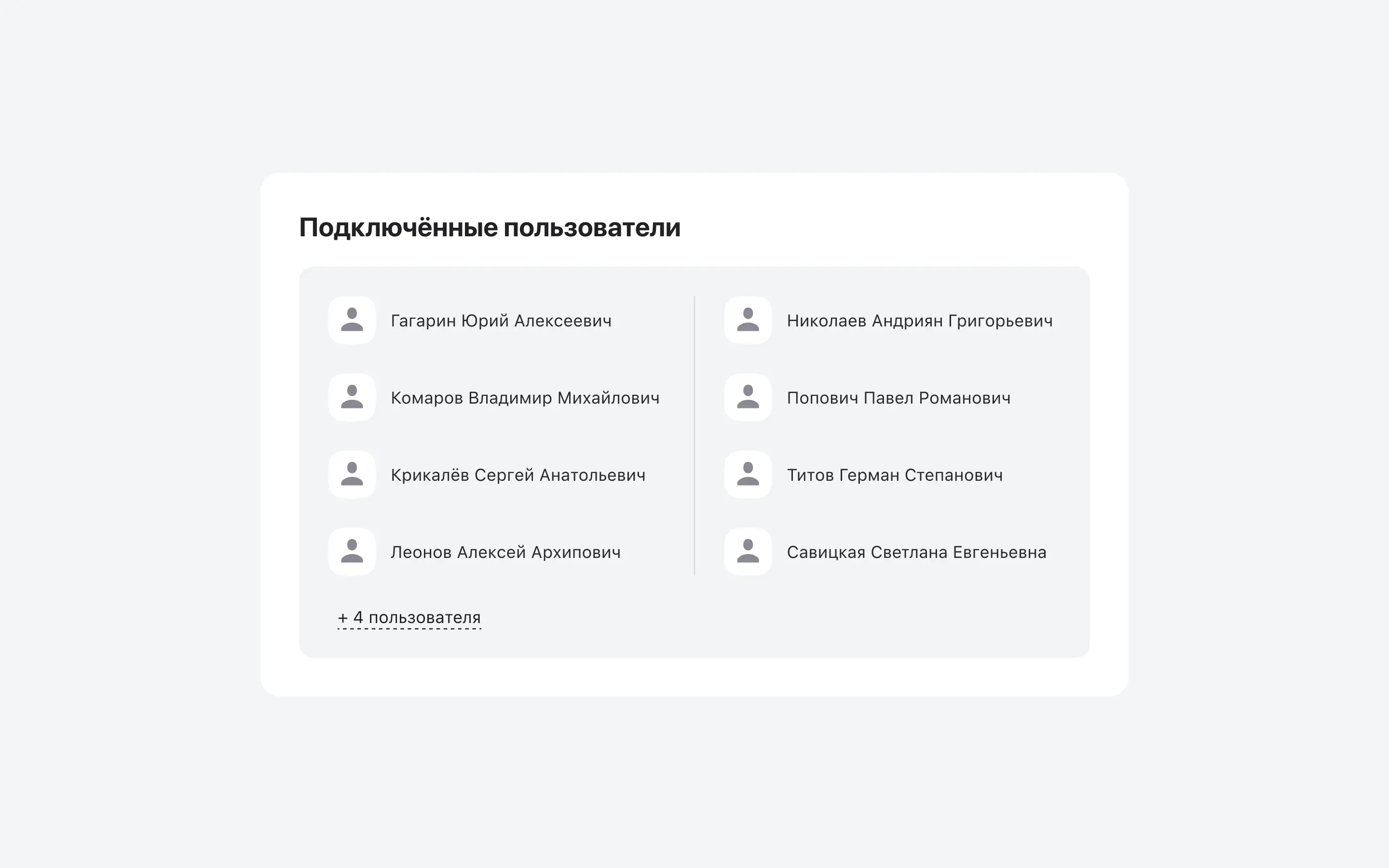
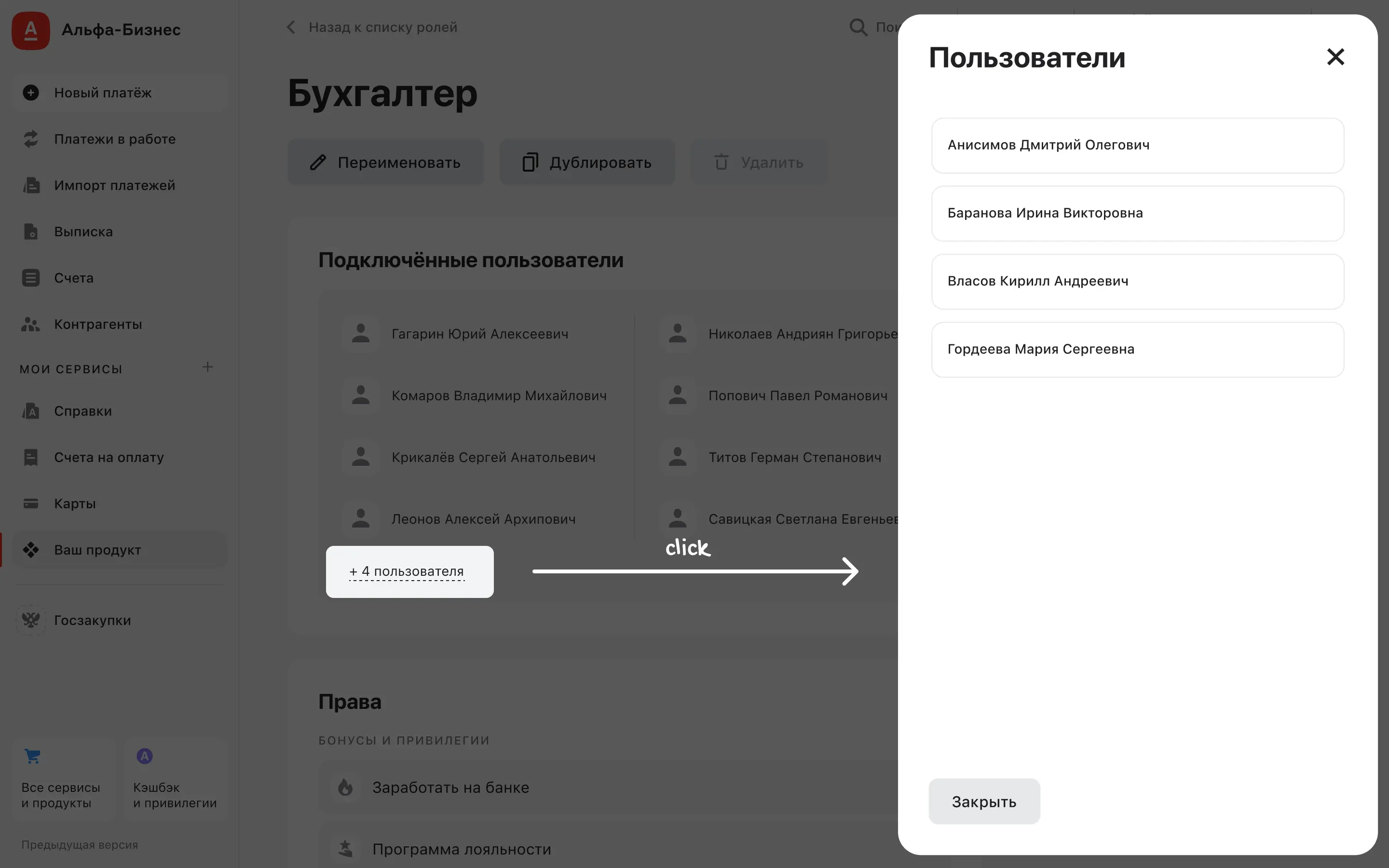
Problem: The Assigned users block did not scale. It used space inefficiently and kept growing downward, pushing key content below the fold as more users were added.
Solution: I redesigned the Assigned users block to show up to 9 people right on the page, because in 74% of companies a role typically has 2 to 9 assigned users. For larger teams, the full list opens in a sidebar, so users can review all assigned people without the page becoming scroll heavy.
Problem and solution
Problem: The Assigned users block did not scale. It used space inefficiently and kept growing downward, pushing key content below the fold as more users were added.
Solution: I redesigned the Assigned users block to show up to 9 people right on the page, because in 74% of companies a role typically has 2 to 9 assigned users. For larger teams, the full list opens in a sidebar, so users can review all assigned people without the page becoming scroll heavy.
Problem and solution
Problem: The Assigned users block did not scale. It used space inefficiently and kept growing downward, pushing key content below the fold as more users were added.
Solution: I redesigned the Assigned users block to show up to 9 people right on the page, because in 74% of companies a role typically has 2 to 9 assigned users. For larger teams, the full list opens in a sidebar, so users can review all assigned people without the page becoming scroll heavy.
Problem and solution
Problem: The Assigned users block did not scale. It used space inefficiently and kept growing downward, pushing key content below the fold as more users were added.
Solution: I redesigned the Assigned users block to show up to 9 people right on the page, because in 74% of companies a role typically has 2 to 9 assigned users. For larger teams, the full list opens in a sidebar, so users can review all assigned people without the page becoming scroll heavy.
Problem and solution
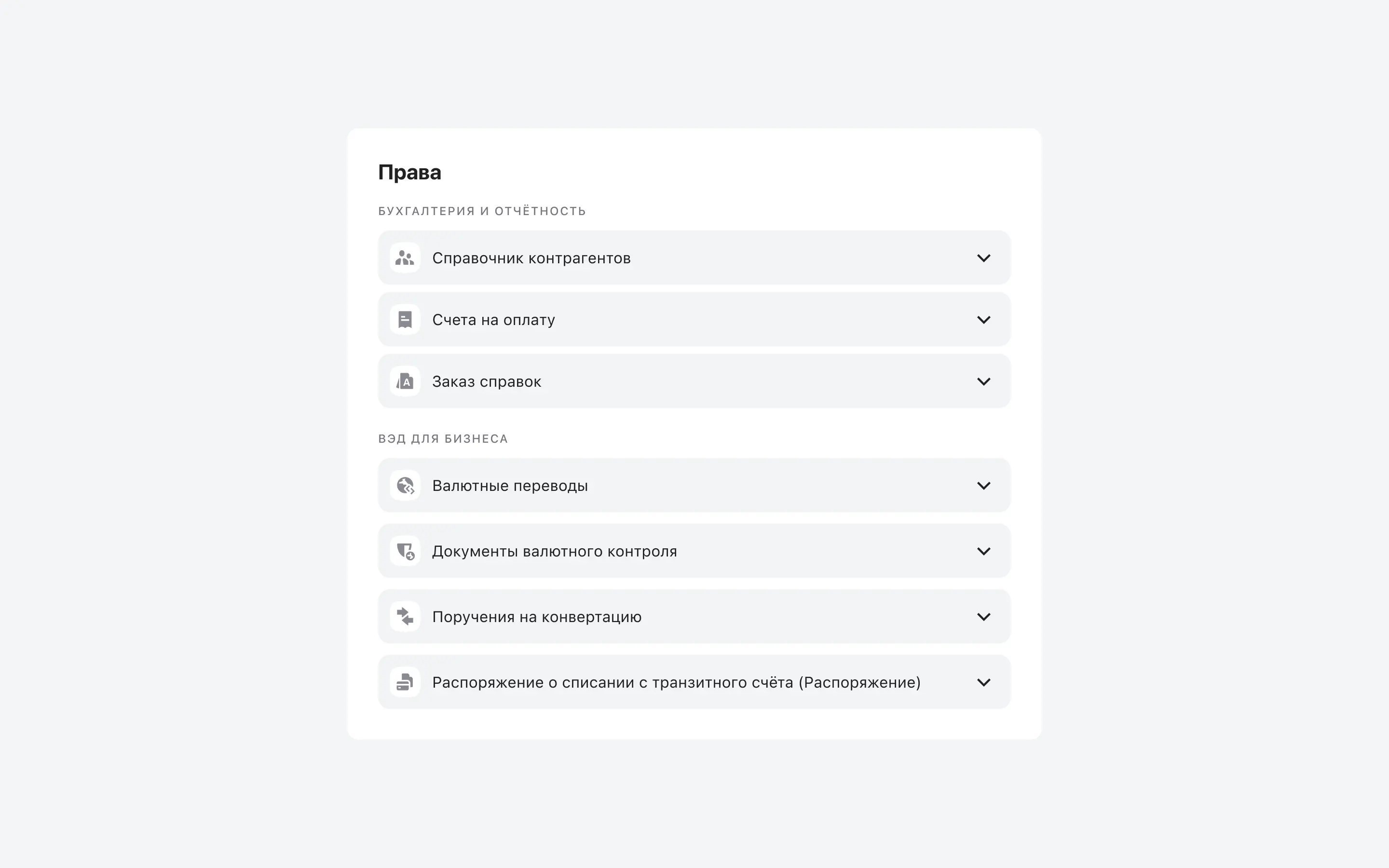
Problem: Roles could have 40+ permission sections, so understanding what a role can do required opening many sections one by one and made the page slow to work with.
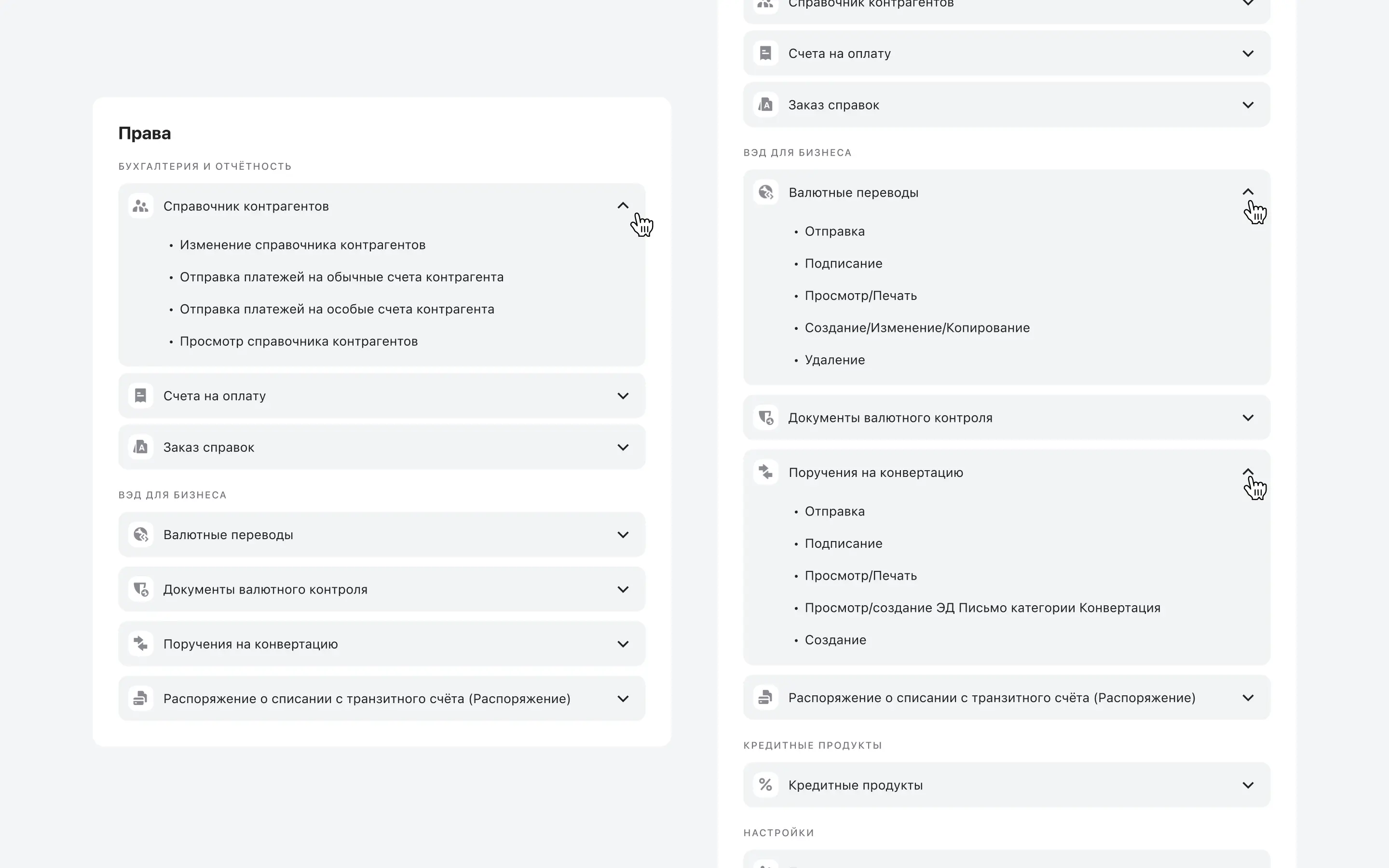
Problem: Expanding sections relied on small chevrons placed away from section titles, so it was unclear where to click and easy to miss.
Solution: I redesigned the permissions block into a single, scannable structure and made the whole row clickable, so users could review large roles faster and with fewer misclicks.
Solution: I aligned the expand interaction with the section titles and improved visual hierarchy, so it became obvious how to open sections and keep context while browsing permissions.
Problem and solution
Problem: Roles could have 40+ permission sections, so understanding what a role can do required opening many sections one by one and made the page slow to work with.
Problem: Expanding sections relied on small chevrons placed away from section titles, so it was unclear where to click and easy to miss.
Solution: I redesigned the permissions block into a single, scannable structure and made the whole row clickable, so users could review large roles faster and with fewer misclicks.
Solution: I aligned the expand interaction with the section titles and improved visual hierarchy, so it became obvious how to open sections and keep context while browsing permissions.
Problem and solution
Problem: Roles could have 40+ permission sections, so understanding what a role can do required opening many sections one by one and made the page slow to work with.
Problem: Expanding sections relied on small chevrons placed away from section titles, so it was unclear where to click and easy to miss.
Solution: I redesigned the permissions block into a single, scannable structure and made the whole row clickable, so users could review large roles faster and with fewer misclicks.
Solution: I aligned the expand interaction with the section titles and improved visual hierarchy, so it became obvious how to open sections and keep context while browsing permissions.
Problem and solution
Problem: Roles could have 40+ permission sections, so understanding what a role can do required opening many sections one by one and made the page slow to work with.
Problem: Expanding sections relied on small chevrons placed away from section titles, so it was unclear where to click and easy to miss.
Solution: I redesigned the permissions block into a single, scannable structure and made the whole row clickable, so users could review large roles faster and with fewer misclicks.
Solution: I aligned the expand interaction with the section titles and improved visual hierarchy, so it became obvious how to open sections and keep context while browsing permissions.
Results
After release, we tracked improvements across key role management flows. We combined product analytics (event funnels and time-to-complete) with task-based usability testing to confirm that teams reach the roles list faster, discover key actions more easily, and review permissions with fewer errors.
Results
After release, we tracked improvements across key role management flows. We combined product analytics (event funnels and time-to-complete) with task-based usability testing to confirm that teams reach the roles list faster, discover key actions more easily, and review permissions with fewer errors.
Results
After release, we tracked improvements across key role management flows. We combined product analytics (event funnels and time-to-complete) with task-based usability testing to confirm that teams reach the roles list faster, discover key actions more easily, and review permissions with fewer errors.
Results
After release, we tracked improvements across key role management flows. We combined product analytics (event funnels and time-to-complete) with task-based usability testing to confirm that teams reach the roles list faster, discover key actions more easily, and review permissions with fewer errors.
navigation success
Task success to reach the Roles list from Users and Roles
+91%
Median time from Users and Roles to the Roles list
x5 faster
action discovery
Task success to find role actions in the three dot menu
+65%
Median time to access role actions (first time)
-38%
navigation success
Task success to reach the Roles list from Users and Roles
+91%
Median time from Users and Roles to the Roles list
x5 faster
action discovery
Task success to find role actions in the three dot menu
+65%
Median time to access role actions (first time)
-38%
navigation success
Task success to reach the Roles list from Users and Roles
+91%
Median time from Users and Roles to the Roles list
x5 faster
action discovery
Task success to find role actions in the three dot menu
+65%
Median time to access role actions (first time)
-38%
navigation success
Task success to reach the Roles list from Users and Roles
+91%
Median time from Users and Roles to the Roles list
x5 faster
action discovery
Task success to find role actions in the three dot menu
+65%
Median time to access role actions (first time)
-38%
These numbers are genuinely impressive, but they weren’t a surprise: that’s exactly why I like this case so much. I didn’t invent any “new magic”, I fixed the basic UX logic and removed unnecessary friction. The impact showed up clearly in usability testing and held through the first six months in production
These numbers are genuinely impressive, but they weren’t a surprise: that’s exactly why I like this case so much. I didn’t invent any “new magic”, I fixed the basic UX logic and removed unnecessary friction. The impact showed up clearly in usability testing and held through the first six months in production
scroll on top
scroll on top
scroll on top
scroll on top