manage
users
alfa-bank
product designer
users and roles
manage
users
alfa-bank
product designer
users and roles
manage
users
alfa-bank
product designer
users and roles
about
project
Simple user management for business banking
The product "Users and Roles" helps businesses add and manage employees, review access, and control who can perform operations, so daily work stays transparent and secure.
VOC score (4,3 → 4,86 out of 5)
4,86
Task success rate
+31%
Support requests reduced
−23%
Time to complete key tasks
-19%
my role
I was responsible for improving user management. Through research, I identified the main usability issues and redesigned the key flows for navigation, access updates, and permission review.
problems
• Key actions are hard to discover → users waste time and miss important controls. • The users list is hard to scan → finding the right person is slow and error-prone. • Expanding permission sections is slow → reviewing permissions takes longer. • Permissions and account visibility don’t scale → users lose context and make mistakes.
business goals
• Reduce the time to complete key user management tasks • Increase task success when updating account visibility (fewer retries and failed saves) • Reduce support requests related to user management and permissions review • Improve customer satisfaction (VOC) by making user management easier to understand
actions
• Ran user research with a UX researcher to uncover usability issues across key flows • Redesigned navigation, access controls, and permission review based on findings • Validated improvements through usability testing and tracked results after launch
results
• +13% VOC score (4.3 → 4.86) • −19% time to complete key tasks • +31% task success rate for access updates • −23% support requests about permissions and access visibility
about
project
Simple user management for business banking
The product "Users and Roles" helps businesses add and manage employees, review access, and control who can perform operations, so daily work stays transparent and secure.
VOC score (4,3 → 4,86 out of 5)
4,86
Task success rate
+31%
Support requests reduced
−23%
Time to complete key tasks
-19%
my role
I was responsible for improving user management. Through research, I identified the main usability issues and redesigned the key flows for navigation, access updates, and permission review.
problems
• Key actions are hard to discover → users waste time and miss important controls. • The users list is hard to scan → finding the right person is slow and error-prone. • Expanding permission sections is slow → reviewing permissions takes longer. • Permissions and account visibility don’t scale → users lose context and make mistakes.
business goals
• Reduce the time to complete key user management tasks • Increase task success when updating account visibility (fewer retries and failed saves) • Reduce support requests related to user management and permissions review • Improve customer satisfaction (VOC) by making user management easier to understand
actions
• Ran user research with a UX researcher to uncover usability issues across key flows • Redesigned navigation, access controls, and permission review based on findings • Validated improvements through usability testing and tracked results after launch
results
• +13% VOC score (4.3 → 4.86) • −19% time to complete key tasks • +31% task success rate for access updates • −23% support requests about permissions and access visibility
about
project
Simple user management for business banking
The product "Users and Roles" helps businesses add and manage employees, review access, and control who can perform operations, so daily work stays transparent and secure.
VOC score (4,3 → 4,86 out of 5)
4,86
Task success rate
+31%
Support requests reduced
−23%
Time to complete key tasks
-19%
my role
I was responsible for improving user management. Through research, I identified the main usability issues and redesigned the key flows for navigation, access updates, and permission review.
problems
• Key actions are hard to discover → users waste time and miss important controls. • The users list is hard to scan → finding the right person is slow and error-prone. • Expanding permission sections is slow → reviewing permissions takes longer. • Permissions and account visibility don’t scale → users lose context and make mistakes.
business goals
• Reduce the time to complete key user management tasks • Increase task success when updating account visibility (fewer retries and failed saves) • Reduce support requests related to user management and permissions review • Improve customer satisfaction (VOC) by making user management easier to understand
actions
• Ran user research with a UX researcher to uncover usability issues across key flows • Redesigned navigation, access controls, and permission review based on findings • Validated improvements through usability testing and tracked results after launch
results
• +13% VOC score (4.3 → 4.86) • −19% time to complete key tasks • +31% task success rate for access updates • −23% support requests about permissions and access visibility
terminology
Product context
In corporate online banking, many people use one company account, but they need different access to actions and data. We built Users & Roles to define what each user can do and see, including roles and restrictions, so the interface always shows the right functionality safely.
terminology
Product context
In corporate online banking, many people use one company account, but they need different access to actions and data. We built Users & Roles to define what each user can do and see, including roles and restrictions, so the interface always shows the right functionality safely.
terminology
Product context
In corporate online banking, many people use one company account, but they need different access to actions and data. We built Users & Roles to define what each user can do and see, including roles and restrictions, so the interface always shows the right functionality safely.
what is a role?
A role is a set of permissions that defines which actions a user can perform and which data they can access in the system. A role is not a job title or a person. It is only a configuration of access rules inside the product.
who is a user?
A user is a person who has access to a company account in the internet bank and works with banking services on behalf of the company. What the user can see and do is strictly defined by their role.
what are permissions?
Permissions are specific rights inside a role that allow a user to perform certain actions or view certain data. Roles are built from multiple permissions.
discovery
Understanding how businesses manage users and access
I ran user research with a UX researcher to understand how business owners, CFOs, and accountants manage users in online banking and where they get stuck. We observed workflows, identified key usability issues, and used the insights to guide the redesign.
discovery
Understanding how businesses manage users and access
I ran user research with a UX researcher to understand how business owners, CFOs, and accountants manage users in online banking and where they get stuck. We observed workflows, identified key usability issues, and used the insights to guide the redesign.
discovery
Understanding how businesses manage users and access
I ran user research with a UX researcher to understand how business owners, CFOs, and accountants manage users in online banking and where they get stuck. We observed workflows, identified key usability issues, and used the insights to guide the redesign.
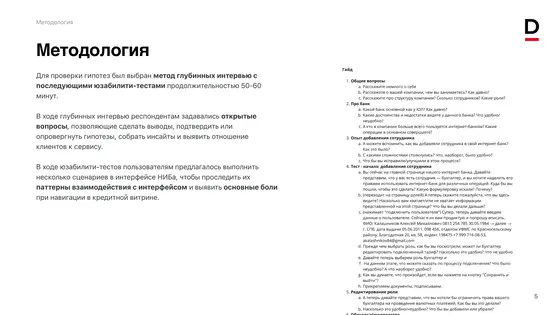
methodology:
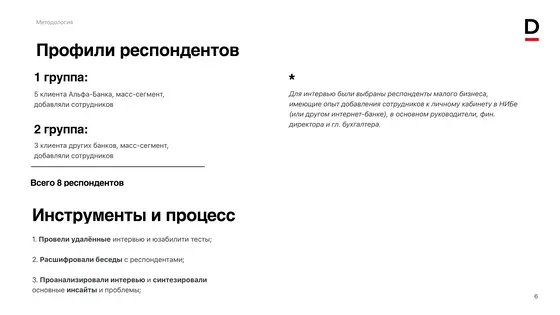
• 8 participants from small businesses (owners, CFOs, accountants) • In-depth interviews + usability testing (50 to 60 min each) • Mix of Alfa-Bank and other banks’ clients (mass-segment)
research goals:
• Analyze how users add employees and manage access in online banking • Identify usability issues and navigation patterns during this process • Find pain points and gaps in current user flows
key tasks:
• Observe how they find a user, review permissions, and update access settings • Detect main problems and frustrations users face • Summarize insights and propose UX improvements • Study how users navigate the “Users and Roles” section (entry points, tabs, logic)
methodology:
• 8 participants from small businesses (owners, CFOs, accountants) • In-depth interviews + usability testing (50 to 60 min each) • Mix of Alfa-Bank and other banks’ clients (mass-segment)
research goals:
• Analyze how users add employees and manage access in online banking • Identify usability issues and navigation patterns during this process • Find pain points and gaps in current user flows
key tasks:
• Observe how they find a user, review permissions, and update access settings • Detect main problems and frustrations users face • Summarize insights and propose UX improvements • Study how users navigate the “Users and Roles” section (entry points, tabs, logic)
methodology:
• 8 participants from small businesses (owners, CFOs, accountants) • In-depth interviews + usability testing (50 to 60 min each) • Mix of Alfa-Bank and other banks’ clients (mass-segment)
research goals:
• Analyze how users add employees and manage access in online banking • Identify usability issues and navigation patterns during this process • Find pain points and gaps in current user flows
key tasks:
• Observe how they find a user, review permissions, and update access settings • Detect main problems and frustrations users face • Summarize insights and propose UX improvements • Study how users navigate the “Users and Roles” section (entry points, tabs, logic)
Research insights
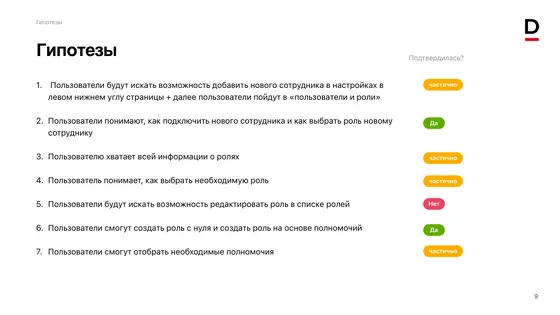
Usability tests and interviews showed that users struggled with a complex interface and hidden functions. Many found it hard to understand the structure, locate key actions, and complete basic tasks.
Research insights
Usability tests and interviews showed that users struggled with a complex interface and hidden functions. Many found it hard to understand the structure, locate key actions, and complete basic tasks.
Research insights
Usability tests and interviews showed that users struggled with a complex interface and hidden functions. Many found it hard to understand the structure, locate key actions, and complete basic tasks.
"A very complicated page. A lot of everything and some kind of a mess. I want to get a clear view of users and the ability to create or configure them immediately"
"A very complicated page. A lot of everything and some kind of a mess. I want to get a clear view of users and the ability to create or configure them immediately"
"A very complicated page. A lot of everything and some kind of a mess. I want to get a clear view of users and the ability to create or configure them immediately"
“Permissions are a mess. I open one group and there are like 25 items, the page shifts and everything jumps. I lose track and can’t tell what’s actually enabled for this user.”
“Permissions are a mess. I open one group and there are like 25 items, the page shifts and everything jumps. I lose track and can’t tell what’s actually enabled for this user.”
“Permissions are a mess. I open one group and there are like 25 items, the page shifts and everything jumps. I lose track and can’t tell what’s actually enabled for this user.”
"The page looks very complicated. Many elements are scattered in random order. There's just too much information for me. I want to just close it because it is impossible to understand anything. If there was a table..."
"The page looks very complicated. Many elements are scattered in random order. There's just too much information for me. I want to just close it because it is impossible to understand anything. If there was a table..."
"The page looks very complicated. Many elements are scattered in random order. There's just too much information for me. I want to just close it because it is impossible to understand anything. If there was a table..."
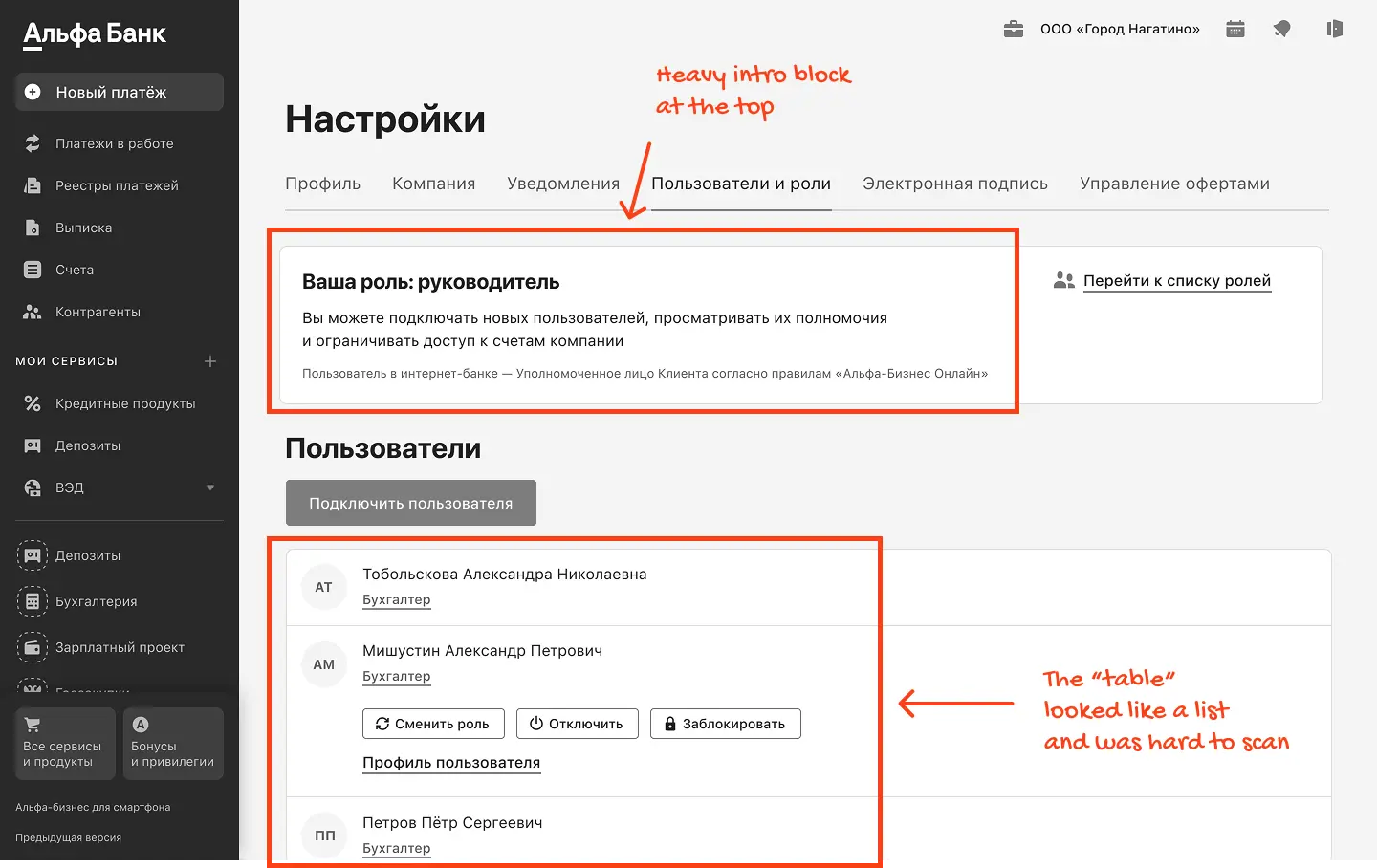
"The quick action buttons are hidden and only become visible when you click on a row, which is not immediately apparent. I would never have realized that they were there"
"The quick action buttons are hidden and only become visible when you click on a row, which is not immediately apparent. I would never have realized that they were there"
"The quick action buttons are hidden and only become visible when you click on a row, which is not immediately apparent. I would never have realized that they were there"
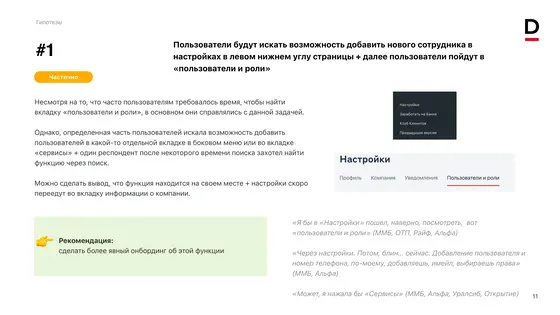
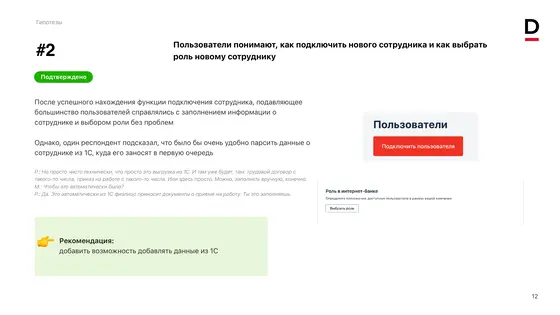
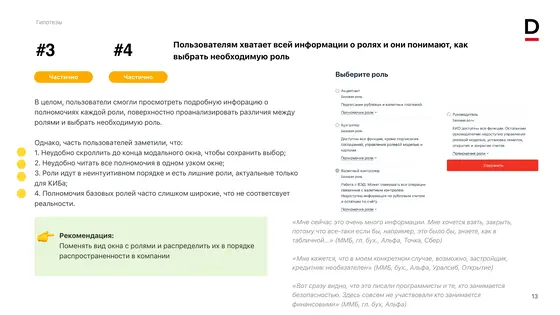
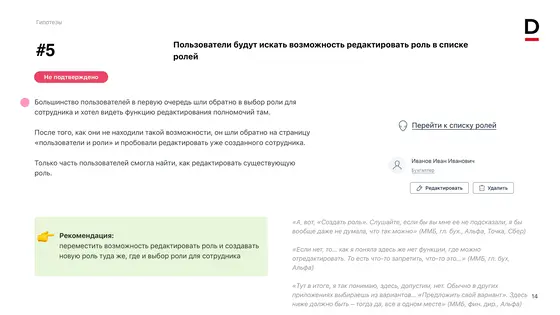
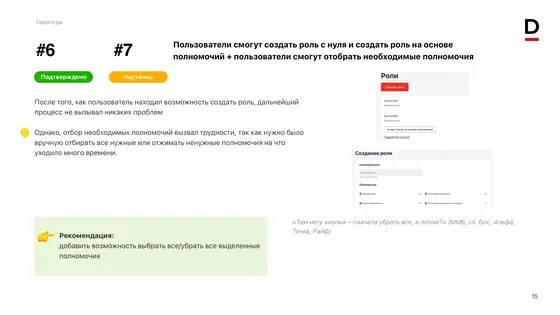
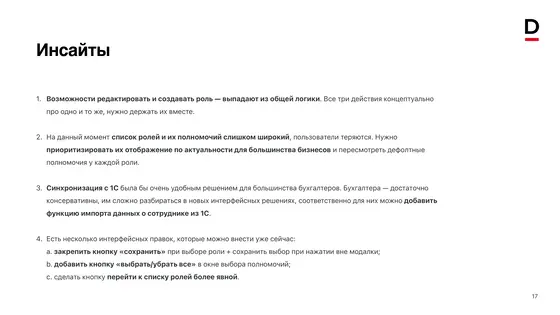
main page
Clear view of users
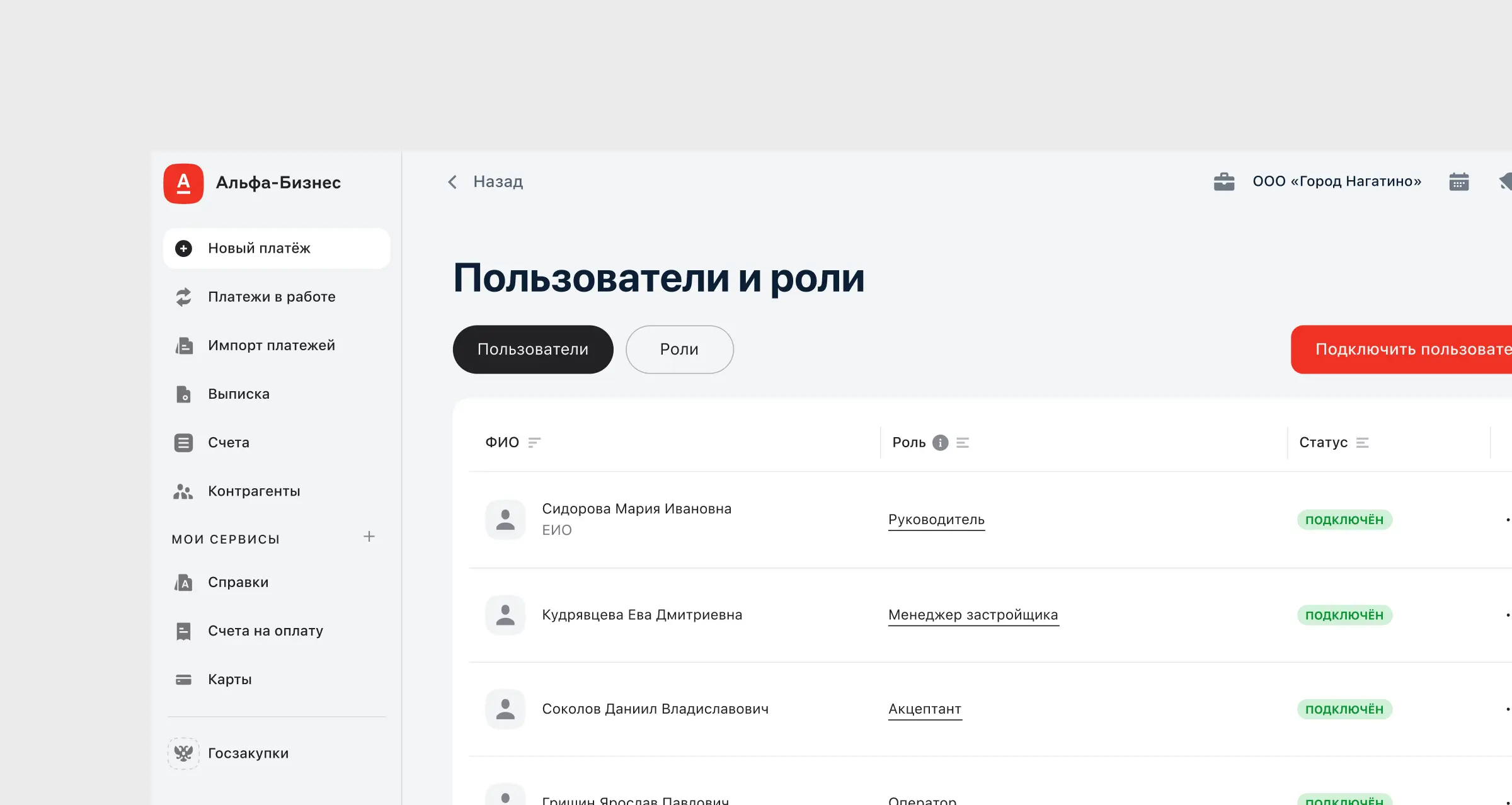
The main page is the starting point for user management. Users should quickly see who can do what and take key actions without extra steps. In this section, I compare the old and redesigned version and show how the new structure speeds up routine work and reduces mistakes
main page
Clear view of users
The main page is the starting point for user management. Users should quickly see who can do what and take key actions without extra steps. In this section, I compare the old and redesigned version and show how the new structure speeds up routine work and reduces mistakes
main page
Clear view of users
The main page is the starting point for user management. Users should quickly see who can do what and take key actions without extra steps. In this section, I compare the old and redesigned version and show how the new structure speeds up routine work and reduces mistakes
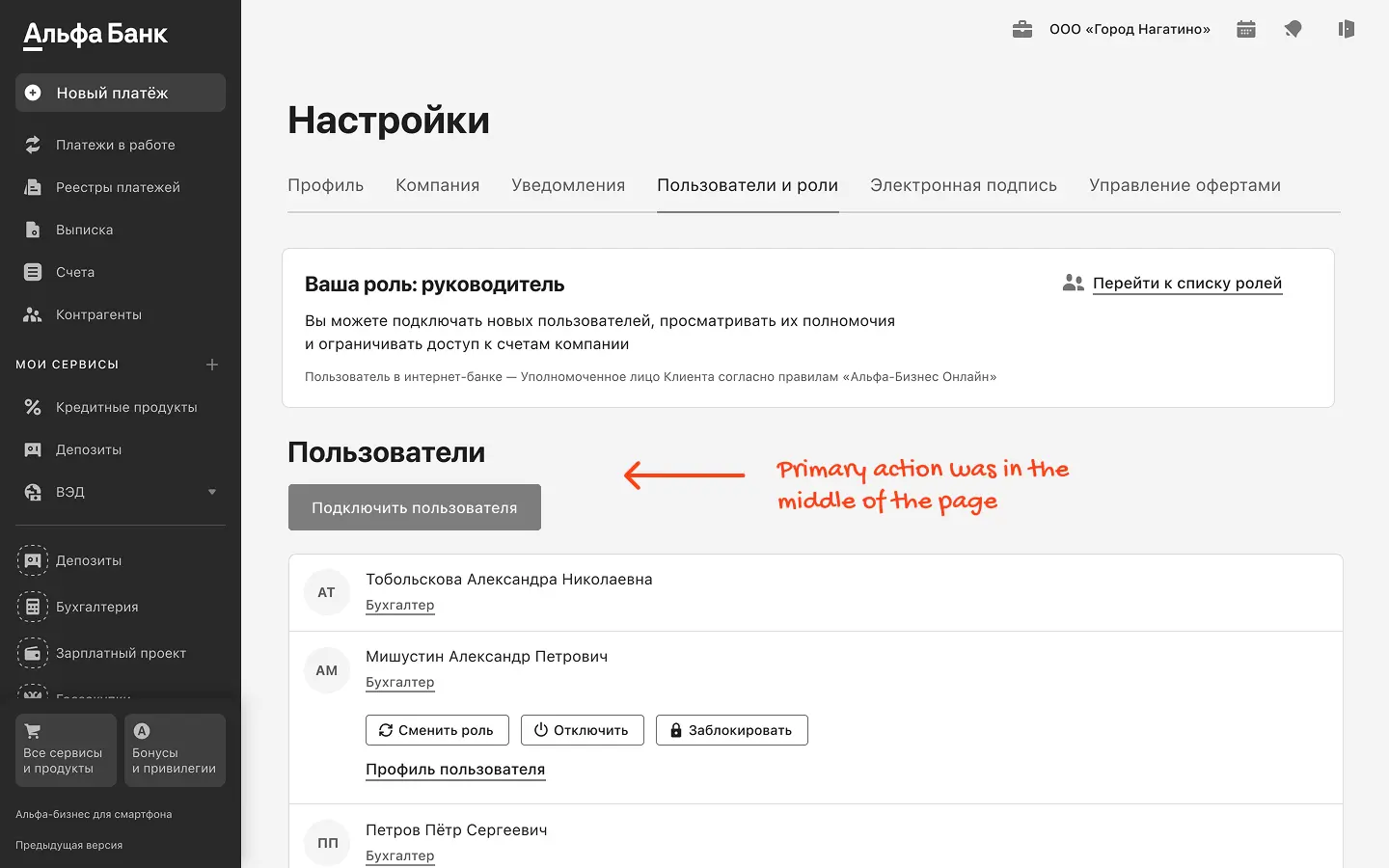
Before redesign
The page was overloaded and hard to scan, especially with long user lists. Key actions were easy to miss, and the structure didn’t help users quickly understand who can do what. As a result, routine user management took longer than it should.
Before redesign
The page was overloaded and hard to scan, especially with long user lists. Key actions were easy to miss, and the structure didn’t help users quickly understand who can do what. As a result, routine user management took longer than it should.
Before redesign
The page was overloaded and hard to scan, especially with long user lists. Key actions were easy to miss, and the structure didn’t help users quickly understand who can do what. As a result, routine user management took longer than it should.
Problems
Permission info wasn’t visible at a glance, so users had to open profiles to confirm it
Key actions were hard to discover, so users spent extra time looking for the right option
The page was hard to scan because of weak structure and too much content
Problems
Permission info wasn’t visible at a glance, so users had to open profiles to confirm it
Key actions were hard to discover, so users spent extra time looking for the right option
The page was hard to scan because of weak structure and too much content
Problems
Permission info wasn’t visible at a glance, so users had to open profiles to confirm it
Key actions were hard to discover, so users spent extra time looking for the right option
The page was hard to scan because of weak structure and too much content
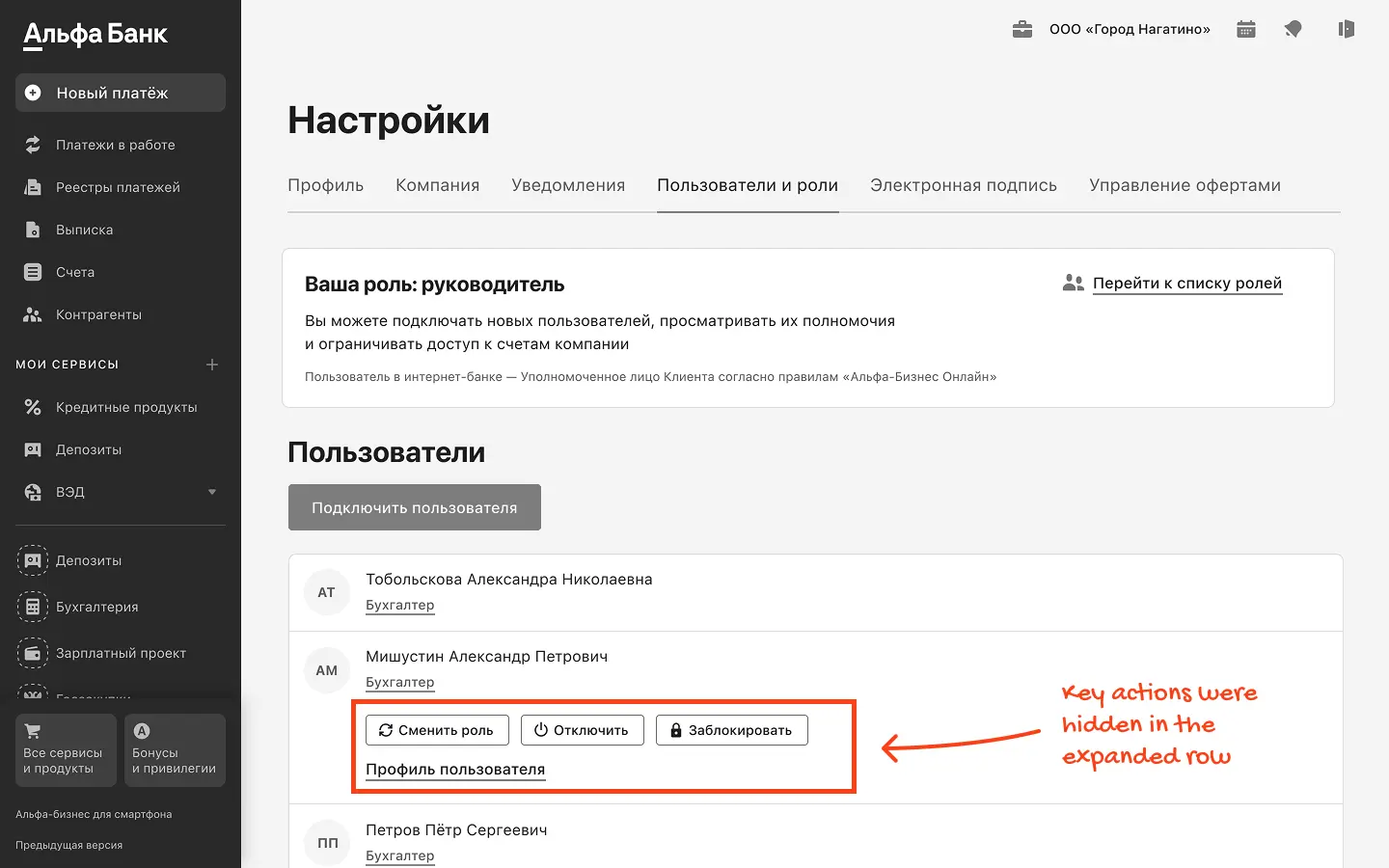
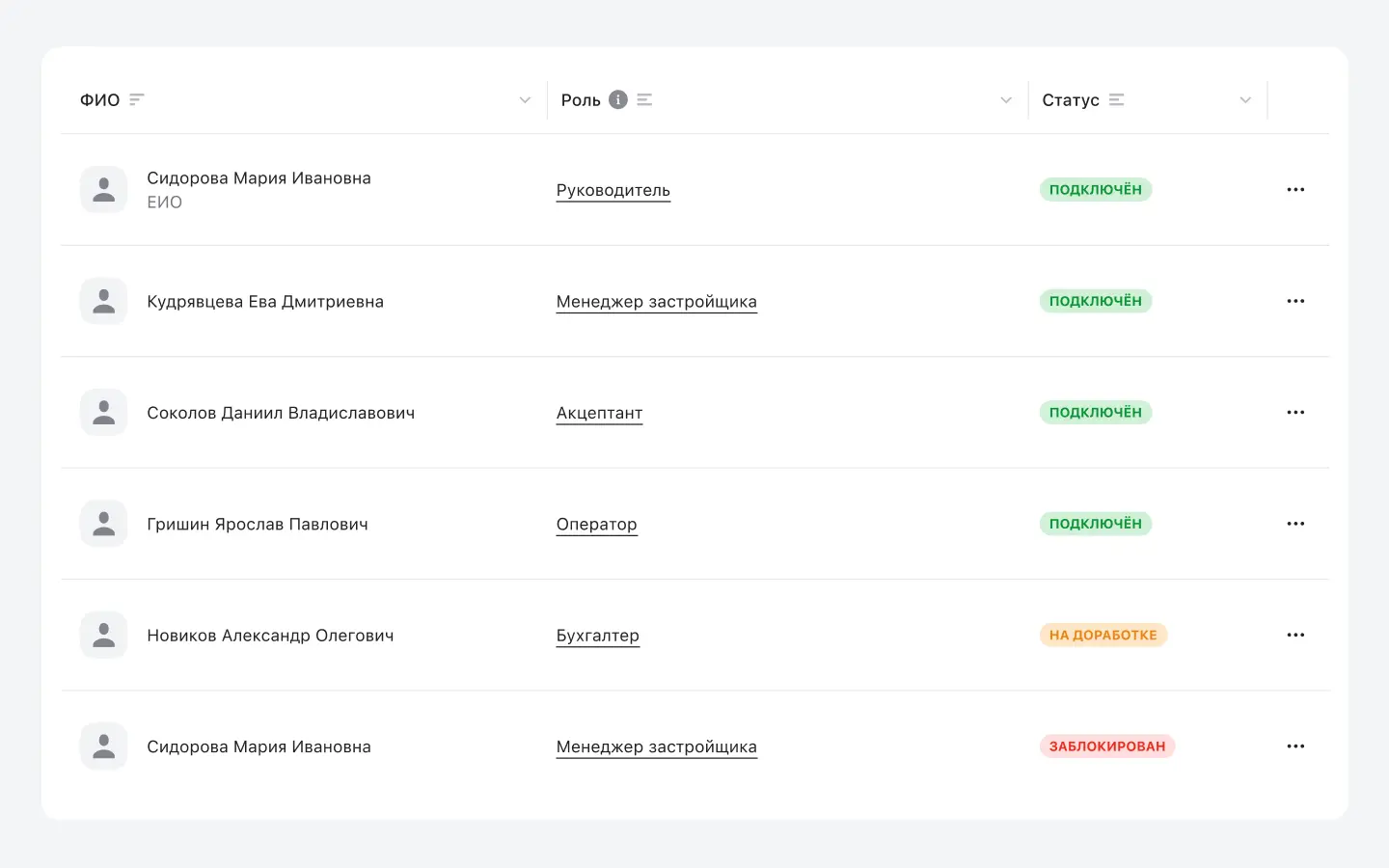
After redesign
I focused on a cleaner structure and more predictable controls to make everyday user management faster and less confusing.
After redesign
I focused on a cleaner structure and more predictable controls to make everyday user management faster and less confusing.
After redesign
I focused on a cleaner structure and more predictable controls to make everyday user management faster and less confusing.
Problem and solution
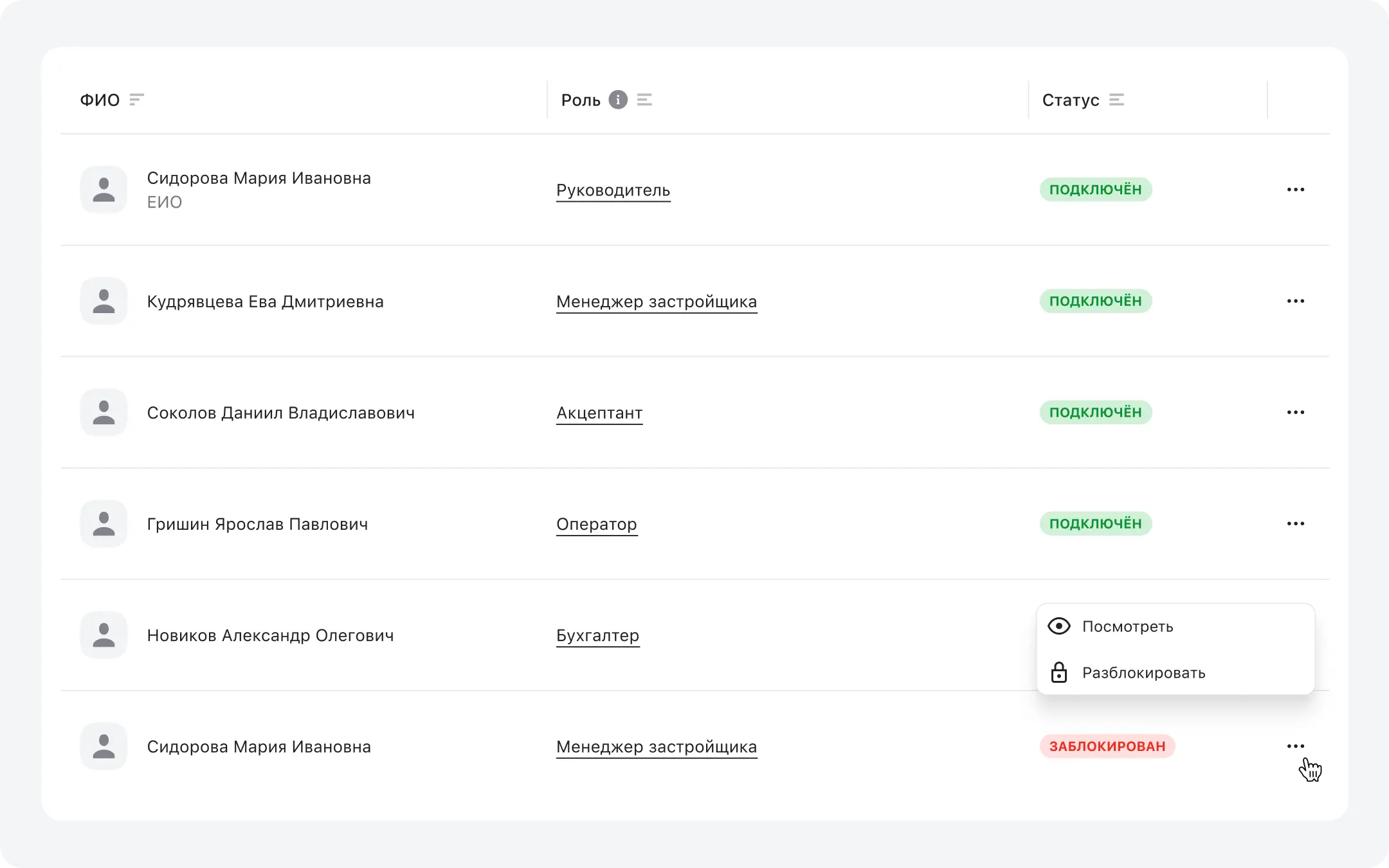
Problem: the page was hard to scan because it had too much content and weak structure.
Solution: I redesigned the page into a familiar table with clear columns and simple layout. This made the list easy to scan, helped users find what they need faster, and reduced mistakes during routine actions.
Problem and solution
Problem: the page was hard to scan because it had too much content and weak structure.
Solution: I redesigned the page into a familiar table with clear columns and simple layout. This made the list easy to scan, helped users find what they need faster, and reduced mistakes during routine actions.
Problem and solution
Problem: the page was hard to scan because it had too much content and weak structure.
Solution: I redesigned the page into a familiar table with clear columns and simple layout. This made the list easy to scan, helped users find what they need faster, and reduced mistakes during routine actions.
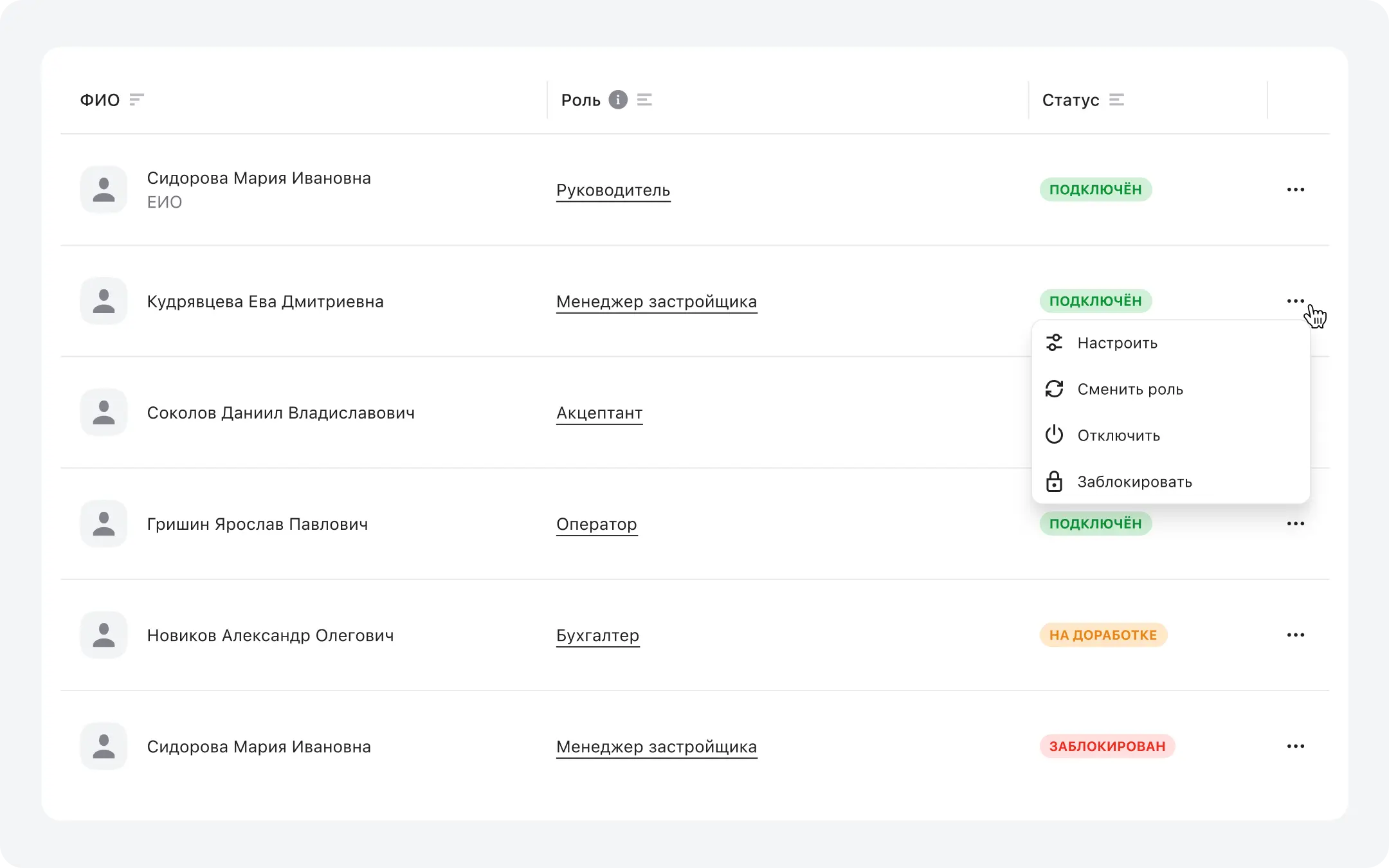
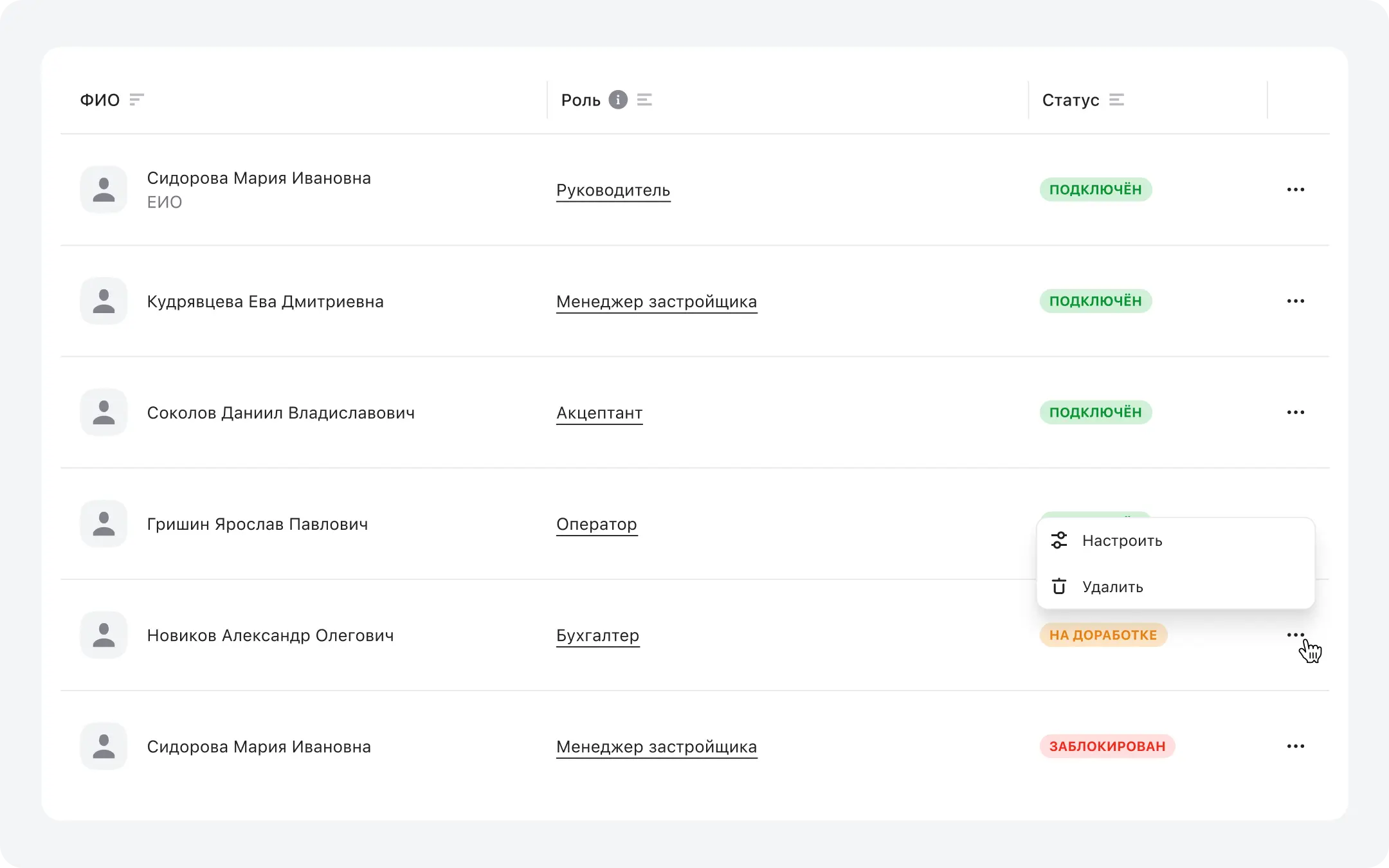
Problem and solution
Problem: key actions were hidden inside an expanded row, so people did not know where to find them.
Solution: I moved key actions into a kebab menu, and the menu changes based on the user’s status. This keeps the list clean and prevents wrong actions, because users only see options that make sense for the current state.
Problem and solution
Problem: key actions were hidden inside an expanded row, so people did not know where to find them.
Solution: I moved key actions into a kebab menu, and the menu changes based on the user’s status. This keeps the list clean and prevents wrong actions, because users only see options that make sense for the current state.
Problem and solution
Problem: key actions were hidden inside an expanded row, so people did not know where to find them.
Solution: I moved key actions into a kebab menu, and the menu changes based on the user’s status. This keeps the list clean and prevents wrong actions, because users only see options that make sense for the current state.
Results
Once the updated main page went live, we saw clear improvements in the core metrics. The results were confirmed through usability tests based on real tasks and by analyzing product data.
Results
Once the updated main page went live, we saw clear improvements in the core metrics. The results were confirmed through usability tests based on real tasks and by analyzing product data.
Results
Once the updated main page went live, we saw clear improvements in the core metrics. The results were confirmed through usability tests based on real tasks and by analyzing product data.
time to task
Median time to find the right user in the list
-14%
Time to open the required user action
−17%
Accuracy
First try accuracy of finding the correct action for a user
+27%
User status change completed successfully (saved without errors or retries)
+19%
Support load
Tickets about “where to find user actions” and “how to manage users”
-7%
time to task
Median time to find the right user in the list
-14%
Time to open the required user action
−17%
Accuracy
First try accuracy of finding the correct action for a user
+27%
User status change completed successfully (saved without errors or retries)
+19%
Support load
Tickets about “where to find user actions” and “how to manage users”
-7%
time to task
Median time to find the right user in the list
-14%
Time to open the required user action
−17%
Accuracy
First try accuracy of finding the correct action for a user
+27%
User status change completed successfully (saved without errors or retries)
+19%
Support load
Tickets about “where to find user actions” and “how to manage users”
-7%
user page
User profile and permissions
Research showed that users struggled with configuring permissions, and the existing structure did not support future feature growth. The page was fully restructured to make permission management clearer, more flexible, and ready for expansion
user page
User profile and permissions
Research showed that users struggled with configuring permissions, and the existing structure did not support future feature growth. The page was fully restructured to make permission management clearer, more flexible, and ready for expansion
user page
User profile and permissions
Research showed that users struggled with configuring permissions, and the existing structure did not support future feature growth. The page was fully restructured to make permission management clearer, more flexible, and ready for expansion
Before redesign
During testing, users took longer to review permissions in the user profile. They often had to navigate between sections and expand multiple blocks to confirm what a user can do.
Before redesign
During testing, users took longer to review permissions in the user profile. They often had to navigate between sections and expand multiple blocks to confirm what a user can do.
Before redesign
During testing, users took longer to review permissions in the user profile. They often had to navigate between sections and expand multiple blocks to confirm what a user can do.
Problems
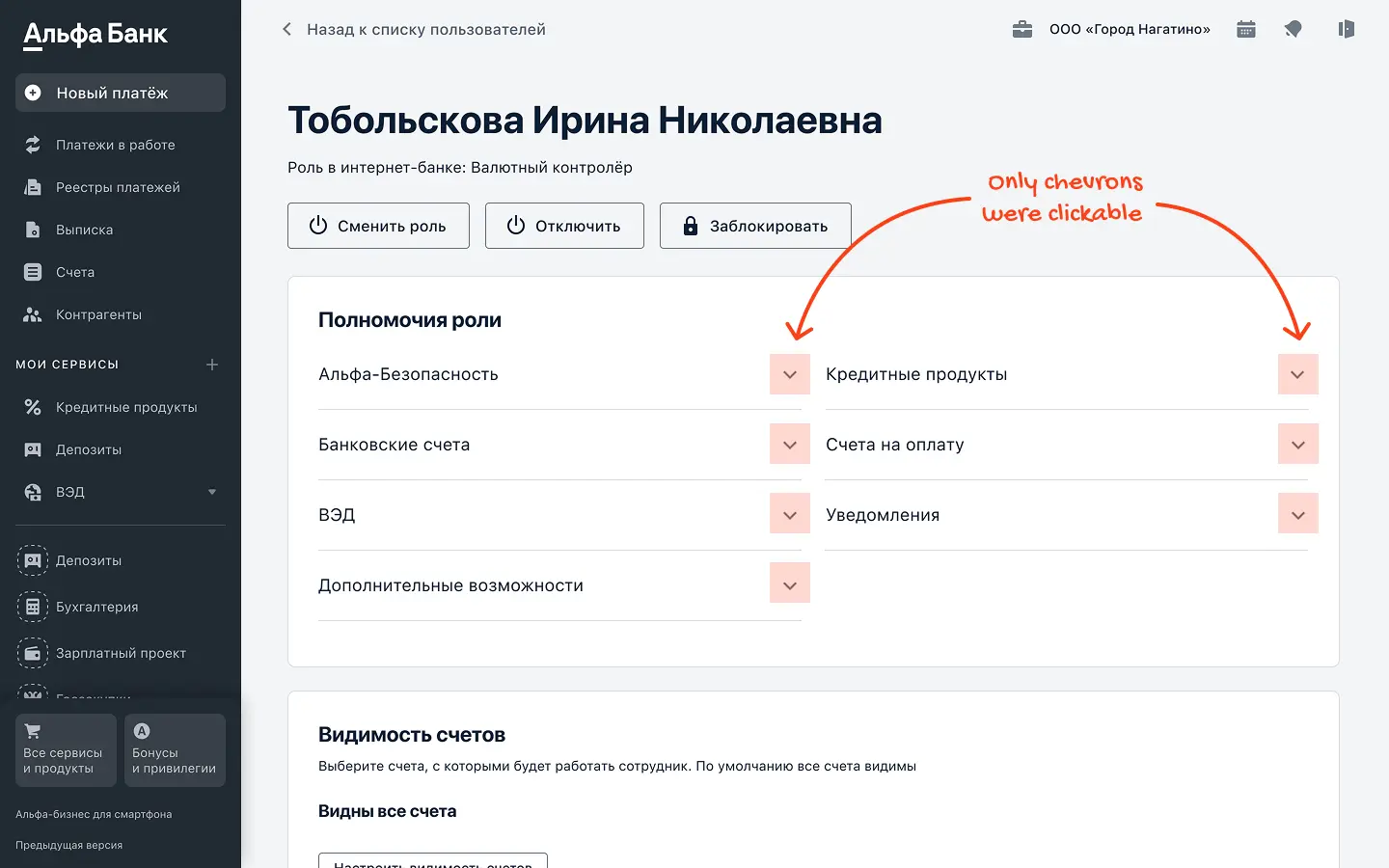
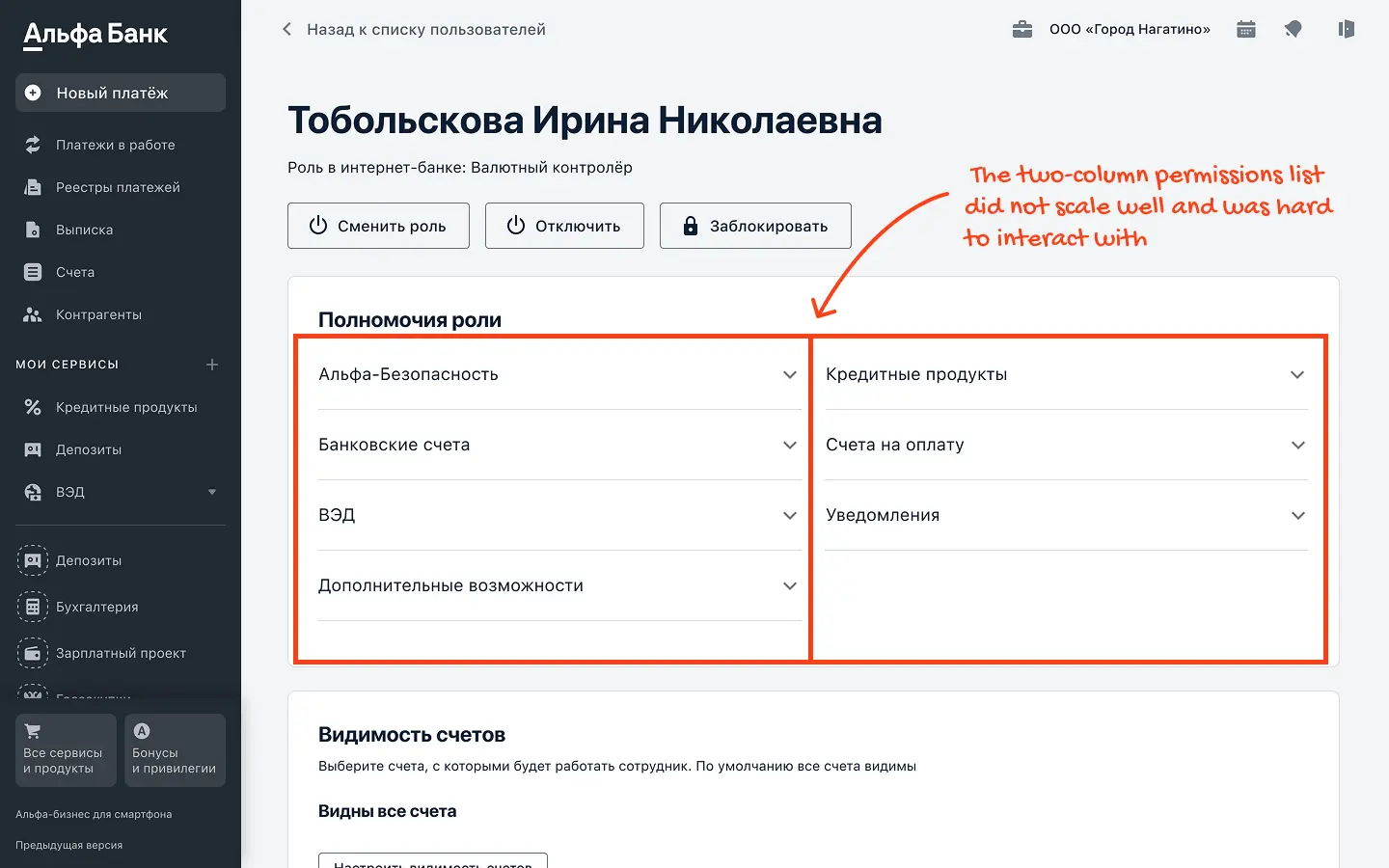
Expanding sections in the Role permissions block relied on small chevrons placed away from the section titles, breaking proximity and making it unclear where to click.
Permissions were hard to scan at scale. With 40+ product sections, users had to open each product header to see its permissions, which slowed down review.
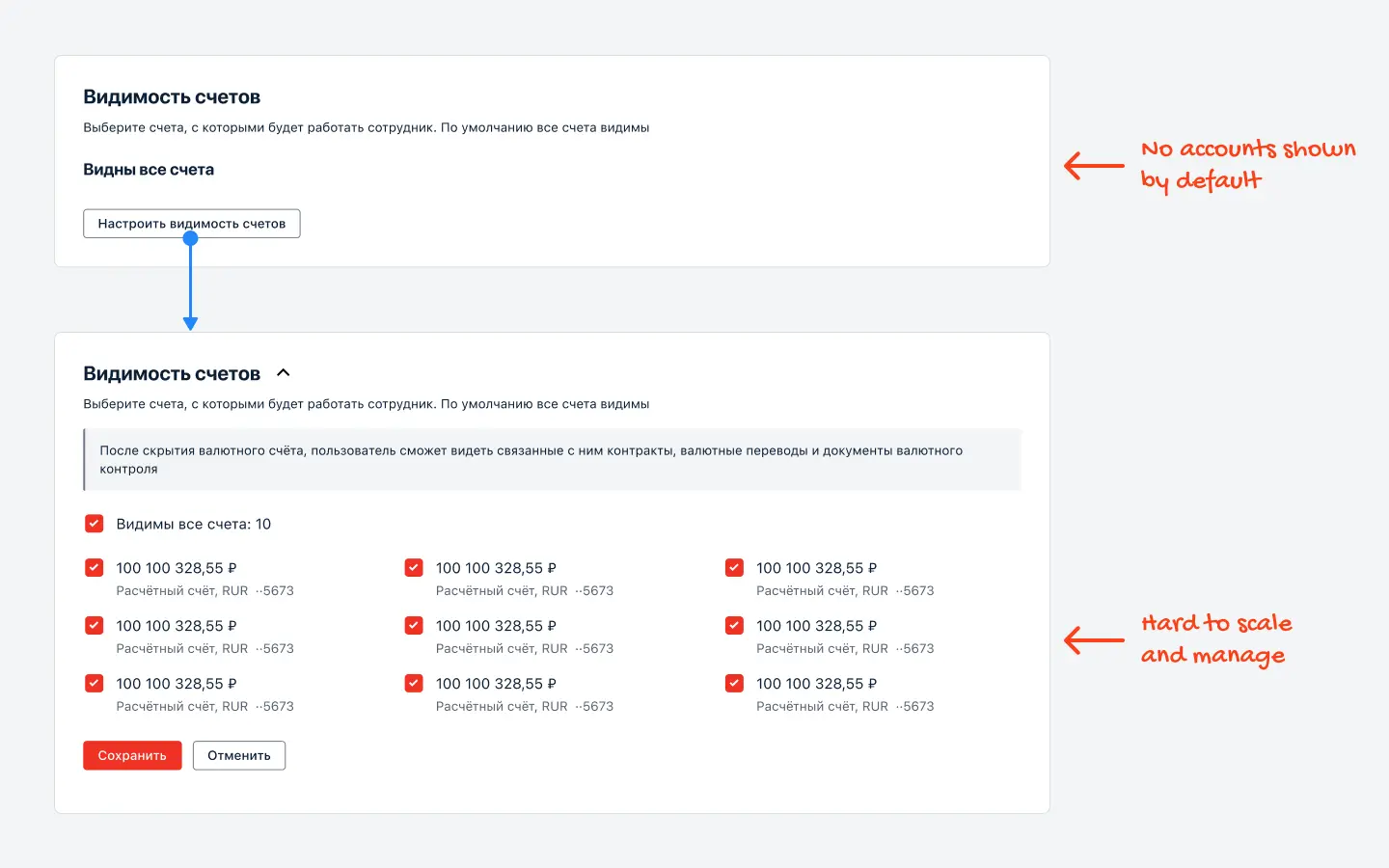
The Account visibility block was not informative by default and required an extra click to see the actual accounts. With up to 56 accounts, it did not scale well and made updates slower.
Problems
Expanding sections in the Role permissions block relied on small chevrons placed away from the section titles, breaking proximity and making it unclear where to click.
Permissions were hard to scan at scale. With 40+ product sections, users had to open each product header to see its permissions, which slowed down review.
The Account visibility block was not informative by default and required an extra click to see the actual accounts. With up to 56 accounts, it did not scale well and made updates slower.
Problems
Expanding sections in the Role permissions block relied on small chevrons placed away from the section titles, breaking proximity and making it unclear where to click.
Permissions were hard to scan at scale. With 40+ product sections, users had to open each product header to see its permissions, which slowed down review.
The Account visibility block was not informative by default and required an extra click to see the actual accounts. With up to 56 accounts, it did not scale well and made updates slower.
After redesign
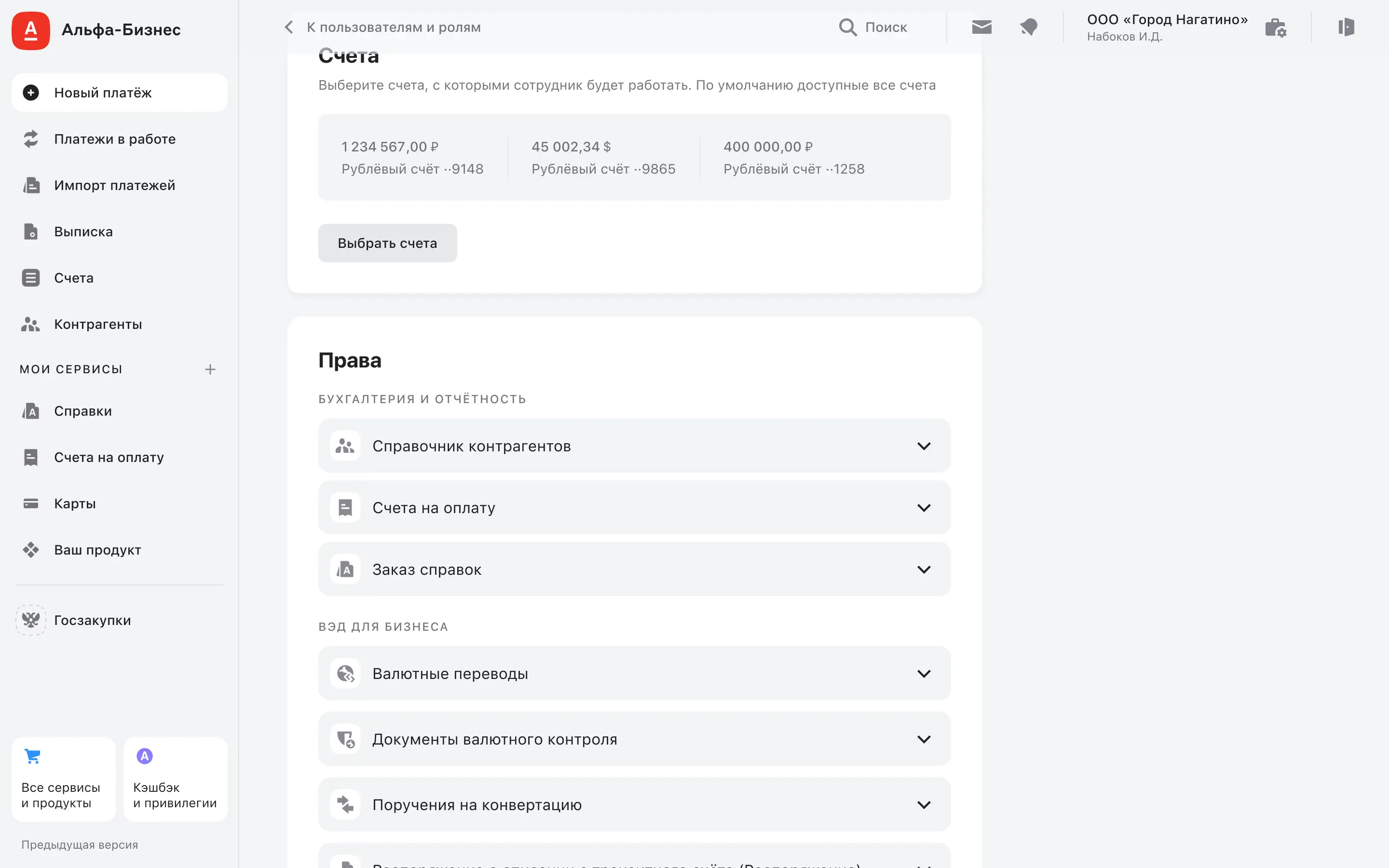
I restructured the user profile page and redesigned how permissions and accounts are displayed. I made permission sections easier to open and scan, grouped them by product categories, and improved account visibility by showing key accounts right away with a scalable sidebar for long lists.
After redesign
I restructured the user profile page and redesigned how permissions and accounts are displayed. I made permission sections easier to open and scan, grouped them by product categories, and improved account visibility by showing key accounts right away with a scalable sidebar for long lists.
After redesign
I restructured the user profile page and redesigned how permissions and accounts are displayed. I made permission sections easier to open and scan, grouped them by product categories, and improved account visibility by showing key accounts right away with a scalable sidebar for long lists.
Problem and solution
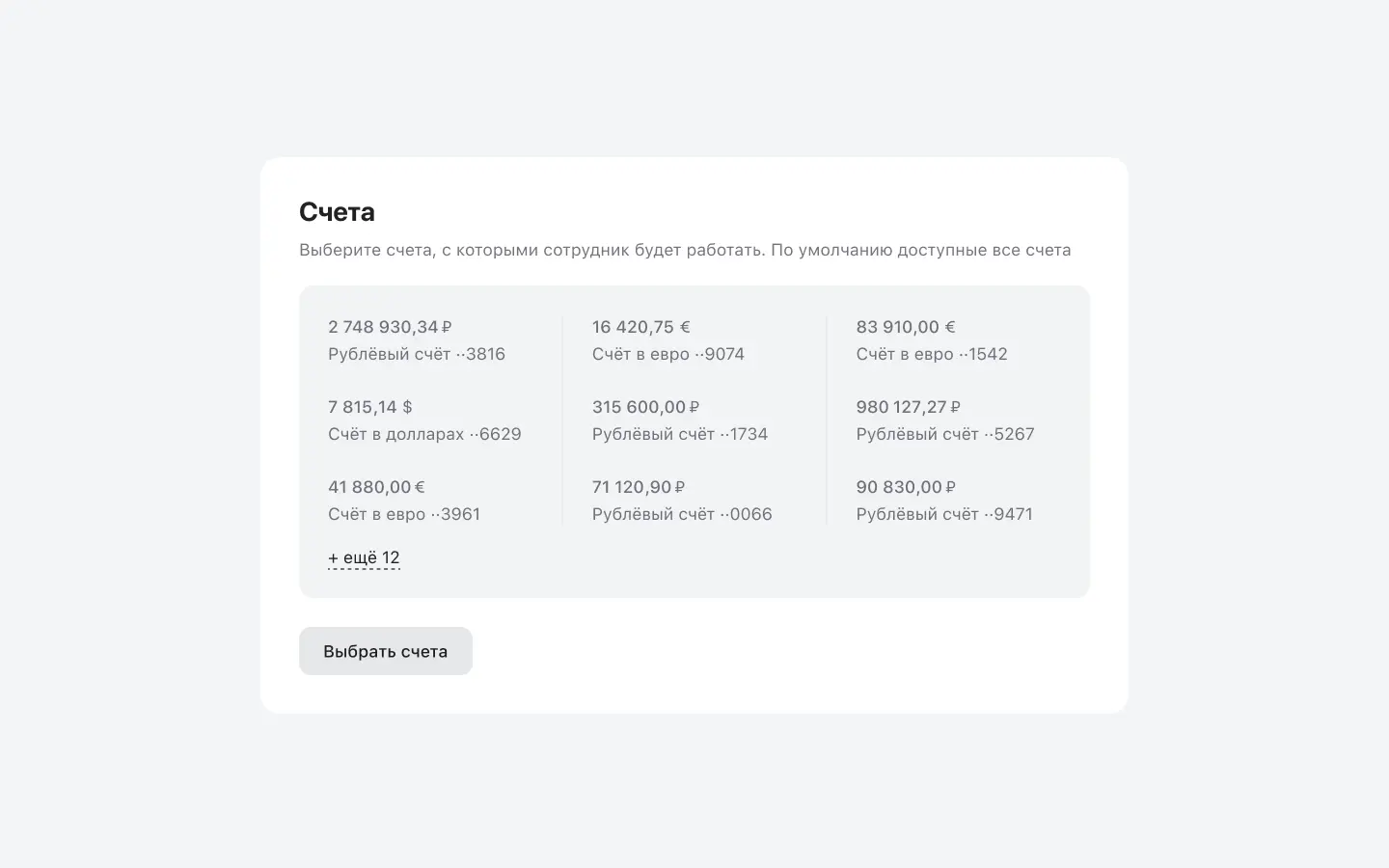
Problem: The Account visibility component was not informative by default and required an extra click to see the actual accounts. With up to 56 accounts, it did not scale well and made updates slower.
Solution: I showed the first accounts directly on the page, because most users have 2–5 accounts and do not need an extra click. For cases with many accounts, I moved the full list into a sidebar with a vertical layout, which is easier to manage at scale.
Problem and solution
Problem: The Account visibility component was not informative by default and required an extra click to see the actual accounts. With up to 56 accounts, it did not scale well and made updates slower.
Solution: I showed the first accounts directly on the page, because most users have 2–5 accounts and do not need an extra click. For cases with many accounts, I moved the full list into a sidebar with a vertical layout, which is easier to manage at scale.
Problem and solution
Problem: The Account visibility component was not informative by default and required an extra click to see the actual accounts. With up to 56 accounts, it did not scale well and made updates slower.
Solution: I showed the first accounts directly on the page, because most users have 2–5 accounts and do not need an extra click. For cases with many accounts, I moved the full list into a sidebar with a vertical layout, which is easier to manage at scale.
Problem and solution
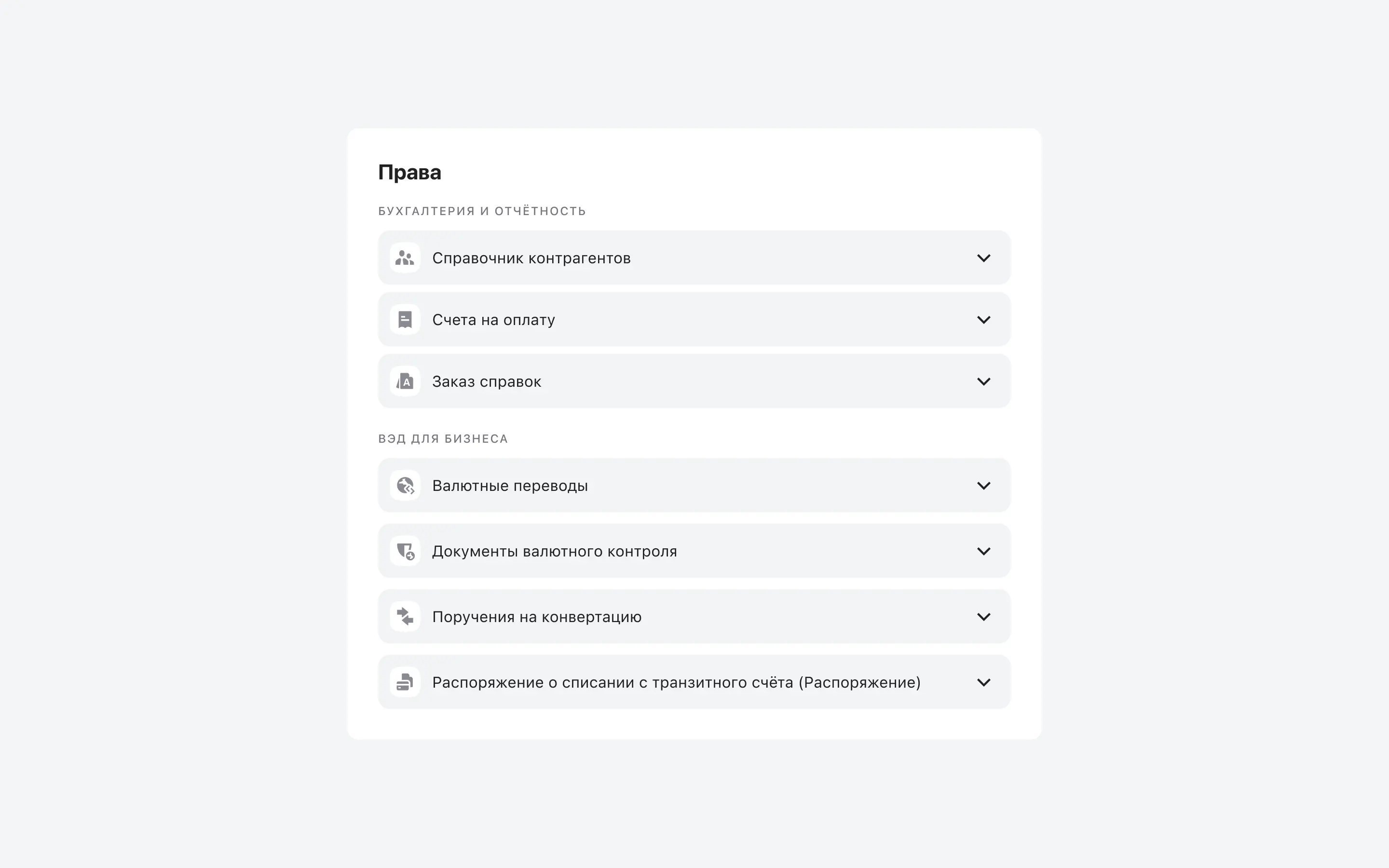
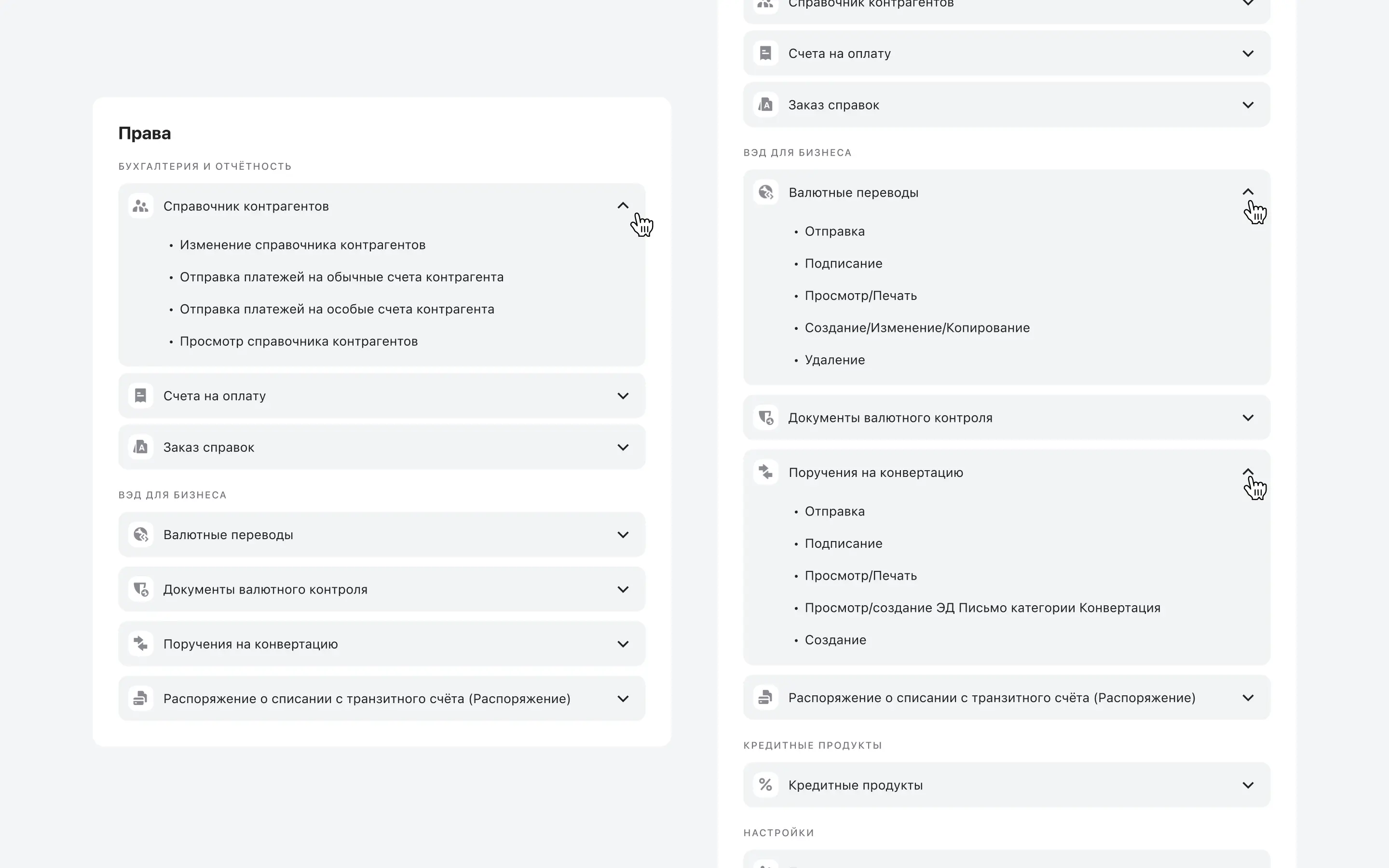
Problem: Expanding sections in the Role permissions block relied on small chevrons placed away from the section titles, breaking proximity and making it unclear where to click.
Problem: Permissions were hard to scan at scale. With 40+ product sections, users had to open each product header to see its permissions, which slowed down review.
Solution: I redesigned the permissions into a single-column list with full-row click targets. This made the list easier to scan, reduced missed clicks on small chevrons, and improved usability when the list grows.
Solution: I reorganized permissions to match the bank’s product catalog structure, so sections follow a familiar product grouping. I also added product icons to make categories easier to recognize and faster to scan.
Problem and solution
Problem: Expanding sections in the Role permissions block relied on small chevrons placed away from the section titles, breaking proximity and making it unclear where to click.
Problem: Permissions were hard to scan at scale. With 40+ product sections, users had to open each product header to see its permissions, which slowed down review.
Solution: I redesigned the permissions into a single-column list with full-row click targets. This made the list easier to scan, reduced missed clicks on small chevrons, and improved usability when the list grows.
Solution: I reorganized permissions to match the bank’s product catalog structure, so sections follow a familiar product grouping. I also added product icons to make categories easier to recognize and faster to scan.
Problem and solution
Problem: Expanding sections in the Role permissions block relied on small chevrons placed away from the section titles, breaking proximity and making it unclear where to click.
Problem: Permissions were hard to scan at scale. With 40+ product sections, users had to open each product header to see its permissions, which slowed down review.
Solution: I redesigned the permissions into a single-column list with full-row click targets. This made the list easier to scan, reduced missed clicks on small chevrons, and improved usability when the list grows.
Solution: I reorganized permissions to match the bank’s product catalog structure, so sections follow a familiar product grouping. I also added product icons to make categories easier to recognize and faster to scan.
Results
Four months after release, we saw significant improvements across the following metrics. These results were measured through task-based usability testing and post-launch product analytics
Results
Four months after release, we saw significant improvements across the following metrics. These results were measured through task-based usability testing and post-launch product analytics
Results
Four months after release, we saw significant improvements across the following metrics. These results were measured through task-based usability testing and post-launch product analytics
time to task
Median time to find a user’s permissions in the selected product
-11%
Median time to review and change account visibility
-18%
success rate
Change account visibility successfully (save without errors or retries)
+31%
First-try accuracy of confirming a user’s permissions in the selected product
+21%
support requests
Tickets about “where to find permissions” and “how to configure accounts”
-23%
time to task
Median time to find a user’s permissions in the selected product
-11%
Median time to review and change account visibility
-18%
success rate
Change account visibility successfully (save without errors or retries)
+31%
First-try accuracy of confirming a user’s permissions in the selected product
+21%
support requests
Tickets about “where to find permissions” and “how to configure accounts”
-23%
time to task
Median time to find a user’s permissions in the selected product
-11%
Median time to review and change account visibility
-18%
success rate
Change account visibility successfully (save without errors or retries)
+31%
First-try accuracy of confirming a user’s permissions in the selected product
+21%
support requests
Tickets about “where to find permissions” and “how to configure accounts”
-23%
scroll on top
scroll on top
scroll on top